
.webp)
Why warranty claim forms still matter in 2026
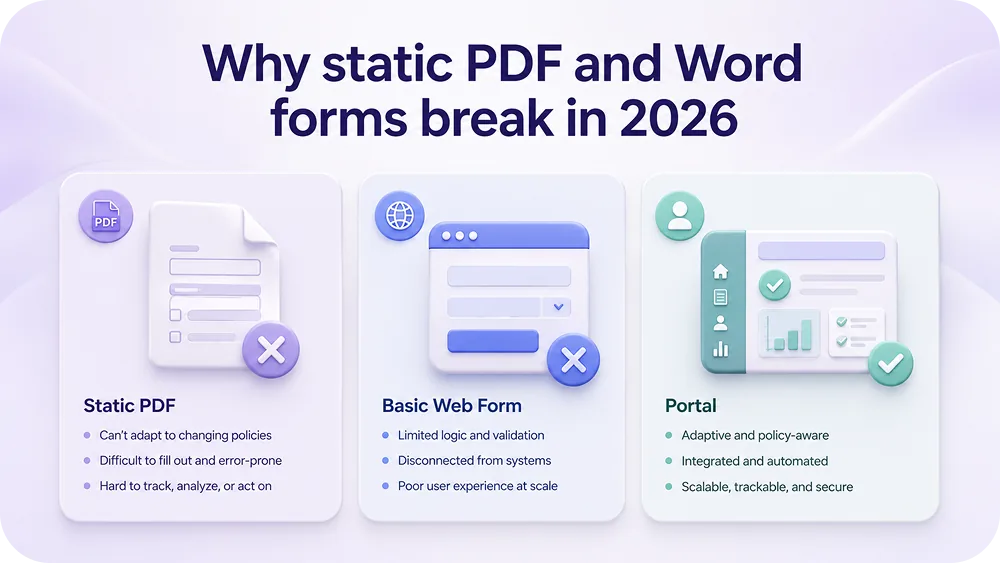
Warranty claim forms are the front door for every after-sales case. Get the form right and the case file arrives complete. Get it wrong and the agent spends two days chasing serial numbers, photos, and order details that should have come in on day one.
This piece covers what a modern warranty claim form needs to capture, seven category-specific templates, the field-by-field walkthrough, and the pattern brands use to replace static PDFs with a portal. For broader warranty claims processing and warranty management best practices, those pieces sit next to this one.
- A warranty claim form has to capture seven core blocks: customer, product, purchase, issue, evidence, consent, and routing data.
- Static PDF and Word templates miss serial validation, evidence rules, and audit trail, which are exactly the fields that decide a case.
- Category-specific templates beat generic ones because the evidence and issue types differ across electronics, furniture, apparel, and B2B.
- Brands using Claimlane replace static forms with a self-service portal that validates serials at entry, asks for the right photos per issue, and routes the case to the right lane automatically.
What a warranty claim form actually needs to capture
The form is a data structure. Seven blocks have to be present for the case to move without back-and-forth.
Customer block
Full name, email, phone, and shipping address. Email and phone are the case team's two channels. Address is needed for repair pickup or replacement shipment.
Product block
Product name, SKU, serial number, batch or lot if relevant. Serial is the single most important field for electronics and any category with serialized product defect tracking. The in-batch piece on serial number tracking software covers why this matters more than most brands realise.
Purchase block
Order number, date of purchase, retailer, and proof of purchase upload. Brands running warranty registration can validate the case from the serial alone, since registration captures purchase date.
Issue block
Issue type (broken, not working, missing parts, cosmetic, other), short description, and date the issue started.
Evidence block
Photos, video for issues that need motion, and any extra documents. The AI image recognition for warranty claims layer reads the evidence at intake.
Consent and policy block
Acknowledgement of warranty terms, data processing consent under GDPR, and any return-shipping conditions.
Routing block
Usually hidden from the customer. The case team needs the SKU-to-supplier mapping, the warranty rule for the product, and the right lane (DOA, repair, replace, refund). This is what static forms always miss and what the 4 pillars of a warranty claims software piece covers in detail.
Why static PDF and Word forms break in 2026
Three reasons the static template pattern falls apart at scale.
No validation at entry
A static form does not check whether the serial number is real, whether the product is in warranty, or whether the issue type matches the evidence. The validation happens in the agent's head, after the case lands.
No audit trail
Emailed PDFs do not log when fields changed, who edited them, or which version the customer signed. Brands trying to defend a case in court or push a supplier chargeback lose without that trail.
No routing logic
Static forms land in a shared inbox. The case team triages manually. Volume above 50 cases a month turns that pattern into a queue. The how to build a claims portal piece covers the alternative.
Template 1: Electronics warranty claim form
Electronics cases need the serial, a power-state photo, and video for devices that turn on but throw errors. The form should require:
- Serial number with format validation
- Product model with auto-fill from serial
- Date the issue started
- Issue type (does not turn on, turns on then fails, intermittent, physical damage)
- Power-state photo (device plugged in, ideally with the screen visible)
- Short video for intermittent or behavioural issues
- Purchase proof if not registered
Electronics cases route fast under AI-assisted warranty claims automation, since image and serial data drive the triage. See also electronics returns and warranty claims.
Template 2: Furniture warranty claim form
Furniture cases run on photos, dimensions, and assembly state. The form should require:
- Photos from at least three angles
- Close-up of the defect
- Note on whether the item was customer-assembled
- Delivery method and condition at delivery
- Issue type (structural, fabric, cosmetic, missing parts, delivery damage)
Furniture warranty cases sit on a longer SLA than electronics, mostly because furniture returns take 47 days on average. The furniture returns management piece covers the operational pattern.
Template 3: Apparel warranty claim form
Apparel runs on size, batch, and wash conditions. The form should require:
- SKU plus size
- Batch or production lot if visible on the tag
- Photo of the defect
- Wash and care history (number of washes, water temperature, detergent type)
- Issue type (seam, fabric, dye, fit, shrinkage)
Apparel warranty is often confused with returns. The line lives in the issue type. Wear-and-tear is not warranty. Defective seam at week 3 is. The implied warranty for ecommerce piece covers the statutory side.
Template 4: Appliance warranty claim form
Appliances need installation context. The form should require:
- Model and serial
- Installation date and method (self vs professional)
- Voltage and power supply for electrical appliances
- Photos of the install location
- Photo or video of the failure mode
- Issue type (does not start, leaks, abnormal noise, error code, cosmetic)
The EU right to repair for home appliances piece covers the repair-first pattern that appliance brands now run under.
Template 5: Sporting goods warranty claim form
Sporting goods need use context. The form should require:
- Product and serial or batch
- Type of use (recreational, competitive, professional)
- Average use frequency
- Photos of the defect
- Issue type (structural, finish, performance, missing parts)
- Date of first use, not just date of purchase
The sporting goods pattern is illustrated in the Angling Direct warranty case study, where the brand rebuilt the claim front-end with serial and category-aware routing.
Template 6: Baby and nursery warranty claim form
Baby and nursery items run on safety. The form should require:
- Product, SKU, batch number
- Date of birth or estimated use age of child
- Photos and short video of the failure
- Issue type (safety, structural, cosmetic, missing parts)
- Statement on whether the product is currently in use
Safety issues route to recall flow under product recall management. The returning nursery furniture should not be hard piece covers the customer-side friction.
"The claim form used to be a free-text email. Now every case arrives with the serial, the photos, and the issue type already classified. Data quality on retailer claims went up sharply in the first quarter."— Konges Sløjd, baby and children's brand (case study)
Template 7: B2B retailer-to-brand warranty claim form
B2B claims are different. The retailer files on behalf of the end customer, and the data needs to support a chargeback to the brand or supplier. The form should require:
- Retailer account and contact
- End customer reference
- Original brand purchase order number
- Invoice and proof of payment
- Product, SKU, serial, quantity affected
- Defect description with photos and video
- Resolution requested (credit, replacement, repair)
B2B flows benefit from hybrid B2C and B2B claims management on a single platform. The B2B warranty claims piece covers the operating pattern, and retailer challenges with supplier claims covers the friction.
How a digital portal replaces static forms
The pattern is consistent across categories. A customer-facing portal validates inputs at entry, asks for the right evidence per issue, and routes the case automatically.
Step 1: Customer enters serial or order
The portal validates against the product database. Cases without valid serials route to a verification lane.
Step 2: Portal asks for the right evidence
Issue type drives the evidence rules. "Will not power on" asks for a power-state photo. "Intermittent failure" asks for video.
Step 3: AI triages the case at intake
Claimlane's AI Agent, the first AI agent purpose-built for warranty claims and returns, reads the evidence, applies the warranty rules per SKU and supplier, and recommends a resolution. The in-batch piece on AI customer service automation for aftersales covers the AI layer in detail.
Step 4: Customer gets status updates
No more "did my form arrive?" emails. Status changes trigger automatic status emails so the customer always knows where the case is.
Step 5: Resolution and case closure
The case closes with a documented resolution, evidence trail, and the data flow to warranty analytics for product quality.
Field-by-field walkthrough
A full warranty claim form should run between 12 and 18 fields. Anything longer drops completion. Anything shorter forces back-and-forth.
| Field | Required | Why it matters |
|---|---|---|
| Full name | Yes | Identity match with order record |
| Yes | Primary case channel | |
| Phone | Optional | Repair pickup coordination |
| Order number | Yes | Validates purchase against the brand's system |
| Serial number | Yes (category-specific) | Unit-level coverage and supplier mapping |
| Issue type | Yes | Drives evidence rules and routing |
| Issue description | Yes | Customer context the AI can read |
| Photo upload | Yes | Visual evidence for triage |
| Video upload | Conditional | Motion-based defects (rattles, leaks, intermittent failure) |
| Consent | Yes | GDPR and warranty terms acknowledgement |
Common mistakes in warranty claim form design
Four patterns appear in almost every audit.
Mistake 1: Free-text issue field with no taxonomy
Customers write whatever they want. The agent re-classifies later. The fix is a short dropdown with three to seven issue types per category.
Mistake 2: Photo upload is optional
Optional uploads turn into no uploads. Required photo plus a clear hint of what to photograph closes that gap.
Mistake 3: No serial validation
The form accepts any string. The agent finds out at triage that the serial is invalid. The fix is validation at entry, the same pattern the in-batch piece on serial number tracking software covers.
Mistake 4: No fraud signal
The form has no way to flag duplicate claims, suspicious patterns, or claims that mismatch the serial history.
From form to resolved case
A good warranty claim form is the first 30 seconds of a case that will run 7 to 14 days. The form has to set the case up for the rest of that flow.
The pattern that works: portal intake, AI triage, decision lane, resolution, and analytics. Brands running it shorten resolution time by 40% on average and reduce customer effort on the case.
Industry view: claims management software in 2026
The broader software category is covered in best claims management software. Brands evaluating their first platform should look at the 4 pillars of a warranty claims software: intake quality, triage logic, routing depth, and analytics. A modern portal covers all four. A static form covers none.
Claimlane handles intake, triage, repair and replacement routing, supplier handoff, and analytics on one platform. The product page on self-service portal covers the customer-facing side. The analytics page covers the reporting layer, and forward-to-supplier covers the recovery side.
Frequently asked questions
Conclusion
A warranty claim form is not a piece of paper. It is the data structure that decides whether the case resolves in three days or three weeks. Static templates carry brands to about 50 cases a month. Above that, the form becomes a portal with serial validation, evidence rules, AI triage, and routing in the same case.
To see how Claimlane handles intake, triage, and resolution on one platform, book a demo or walk the live setup on the interactive demo.



