
.webp)
SAP is the system of record for most enterprise ecommerce brands. It handles the books, the inventory, the supplier orders. It also handles returns, but the standard SAP return order flow was designed for B2B distribution, not for the customer support agent who needs to resolve a damaged jacket on a Tuesday afternoon.
This guide walks through the SAP return order process as it actually runs, the common pitfalls ecommerce teams hit, and where a dedicated returns and warranty tool fills the gaps without ripping out the SAP foundation.
TL;DR
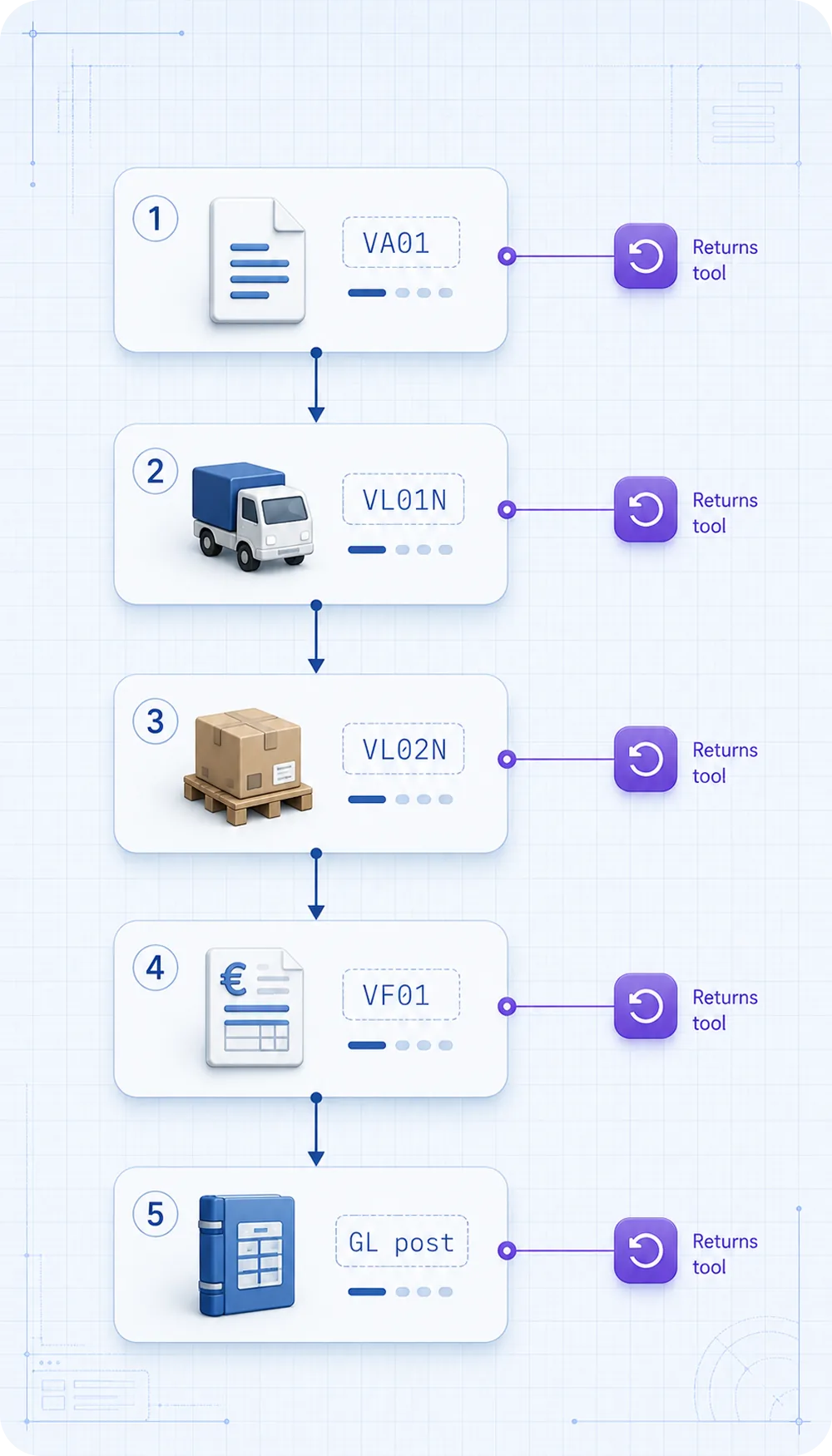
- Standard SAP return order processing is a 5-step flow: return request, return delivery, goods receipt, credit memo, post to GL.
- It works well for B2B distribution. It struggles with consumer claim intake, photo proof, supplier handoff, and warranty rules.
- Most ecommerce brands keep SAP as the financial system and add a returns and warranty tool on the customer-facing side.
- Claimlane integrates with SAP for return order posting, credit memo creation, and supplier claims, while handling intake and AI claim review on top.
What a SAP Return Order Actually Is
In SAP terminology, a return order is a sales document that records a customer's intent to send goods back. It is the formal start of the return process inside the ERP. In SAP S/4HANA and ECC, the standard document type is RE (Returns), distinct from the original sales order (OR) and from the credit memo request (CR).
The return order links the original sales order, the customer master, and the material being returned. Once posted, it triggers downstream documents: return delivery, goods receipt, credit memo. Each step is a separate transaction with its own approval logic. The order management systems explained piece covers how SAP fits the wider OMS landscape.
The Standard SAP Return Order Flow
The canonical flow has five steps. Most ecommerce brands customize at least one of them.
Step 1: Create the Return Order (VA01 with order type RE)
The agent or system creates a return order with reference to the original sales order. Reason for return is captured here as a reason code. The customer credit value sits in the order header.
Step 2: Create the Return Delivery (VL01N)
A return delivery document is created against the return order. This is what the warehouse uses to receive the goods. Until this step, the inventory has not been adjusted.
Step 3: Post Goods Receipt (PGR via VL02N)
When the goods physically arrive at the warehouse, the receiving team posts goods receipt. This adjusts inventory and triggers the next financial step. Some teams add a quality check sub-step here.
Step 4: Create the Credit Memo (VF01 with billing type RE)
The credit memo is the financial document that reverses the original revenue. It posts to the general ledger and clears the receivable. This is where the customer's refund or credit appears.
Step 5: Post to GL and Reconcile
The credit memo posts to the relevant GL accounts. Accounts receivable runs reconciliation. For ecommerce, this is also where payment refunds are triggered through the payment gateway connection. The payment reversals and chargebacks piece covers what happens on the payments side.
How the Same Flow Looks in Microsoft Dynamics 365 Business Central
For brands deciding between SAP and Business Central, the flows are conceptually similar. The sales returns in Business Central guide covers BC step by step, and the Business Central credit memo returns piece goes through the credit side. The Business Central Shopify integration guide covers the ecommerce connection. The Dynamics 365 warranty management piece covers the warranty side specifically.
For NetSuite users, the comparable read is the NetSuite warranty and repairs piece. For a wider view of ERPs handling warranty, see the ERP handle warranty claims overview.
Where the Standard SAP Flow Falls Short for Ecommerce
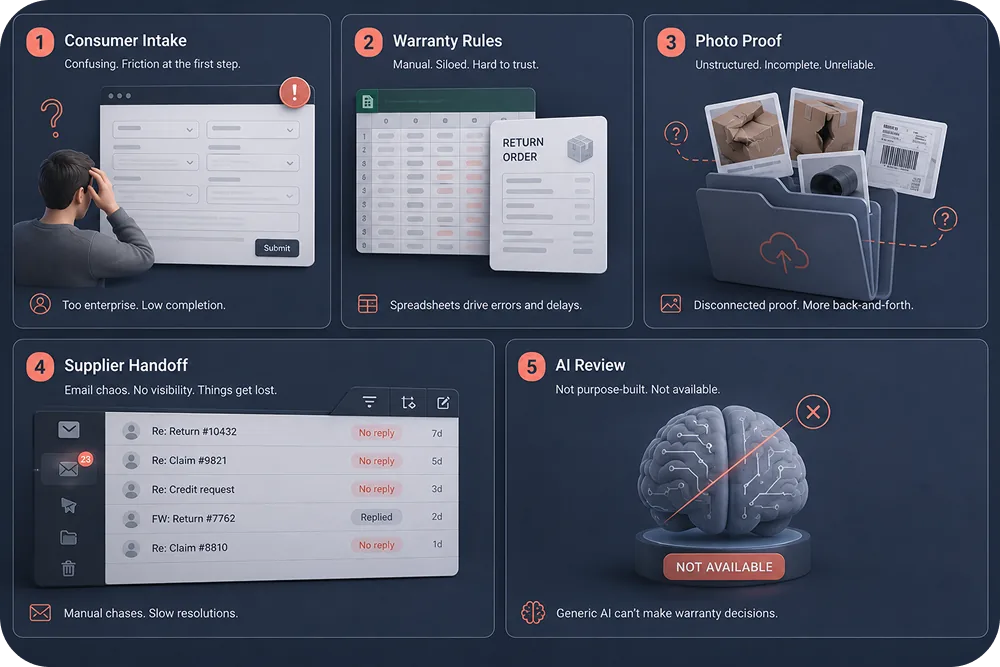
The SAP return order flow was built for predictable B2B distribution: an authorized buyer with a contract, returning whole units to a known warehouse. Ecommerce returns are noisier than that.
Issue 1: Consumer intake is not native
SAP has no consumer-facing portal out of the box. Customers cannot upload photos, attach videos, type in a free-text reason, or pick a resolution preference from a clean UI. Brands end up bolting a custom front-end on top, which becomes its own maintenance project.
Issue 2: Warranty rules sit in spreadsheets
SAP can hold warranty terms in the material master, but warranty rule enforcement (within window, eligible damage type, registered serial number) is not automated in the standard flow. Most teams maintain rules in spreadsheets and apply them manually.
Issue 3: Photo and video proof has no clean home
Claim images live in email or in shared drives. They are not attached to the SAP return order in a way that auditors can find. For categories like furniture and electronics, this is a real problem.
Issue 4: Supplier handoff is manual
When a claim should be forwarded to a supplier for credit recovery, SAP does not have a native flow. Most teams send an email with a screenshot. The retailer challenges with supplier claims piece covers the typical failure modes.
Issue 5: AI claim review is not available
SAP's AI features focus on procurement and finance. There is no AI agent that reads a photo, applies a warranty rule, and recommends a resolution against a return order.
The ERP vs returns management software piece walks through these gaps with examples.
How Brands Actually Run It: SAP + Dedicated Returns Tool
The pattern that works at scale: keep SAP as the financial system of record, add a returns and warranty platform on top for everything customer-facing. The two systems integrate, so the customer-facing tool posts return orders, credit memos, and goods movements into SAP automatically.
This is how brands like Coolshop run their setup. Claim intake, photo review, customer comms, and supplier handoff sit in Claimlane. SAP receives the structured return order and credit memo when the case closes. The ERP returns integrations roundup covers similar integrations across other ERPs.
What Goes in SAP vs What Goes in the Returns Tool
| Workflow Step | Best Home | Why |
|---|---|---|
| Customer claim intake | Returns tool | Photos, video, free text, self-service |
| Warranty rule check | Returns tool | AI plus rules engine, not native in SAP |
| Resolution recommendation | Returns tool | AI review of image proof |
| Customer communication | Returns tool | Email, SMS, portal status updates |
| Return order document (RE) | SAP | Financial system of record |
| Goods receipt | SAP | Inventory accuracy |
| Credit memo (billing type RE) | SAP | Revenue reversal, GL posting |
| Supplier claim handoff | Returns tool | Proof package and supplier portal |
| Claim analytics | Returns tool | SKU and supplier views, not native in SAP |
| Reconciliation | SAP | AR clearing, payments matching |
The pattern: customer side and analytics in the returns tool, financial documents in SAP. The 4 pillars of warranty claims software cover what the returns tool needs to handle.
Common Pitfalls in SAP Return Order Processing
Three pitfalls repeat across SAP-shop ecommerce brands.
Pitfall 1: Reason codes that nobody trusts
SAP supports reason for return codes, but in most setups the codes are too few, too vague, or never reviewed. The result is claim analytics that nobody acts on. The fix is to design reason codes from the analytics question backwards: what decisions should the codes inform?
Pitfall 2: Credit memo logic that ignores warranty
Credit memo creation in SAP is a financial document. It does not check warranty eligibility. If the upstream process did not block ineligible claims, the credit memo posts and the brand pays. The fix is to enforce eligibility in the returns tool before the SAP credit memo runs. The warranty claim software piece covers what eligibility logic should look like.
Pitfall 3: Inventory mismatch between SAP and the warehouse system
Returned goods often sit between systems. The warehouse receives the parcel, the SAP goods receipt has not been posted, and the inventory looks wrong in both places for hours or days. The fix is real-time integration between the WMS and SAP, or at least scheduled syncs with reconciliation rules. The 10 warehouse challenges piece covers adjacent issues.
Integration Approach: Connecting SAP to the Customer Side
The integration between SAP and a returns tool is the make-or-break technical step. There are three viable patterns.
Pattern A: SAP IDocs (legacy ECC)
For ECC shops, IDoc-based integration is mature and reliable. The returns tool sends ORDERS05 (return order) and INVOIC02 (credit memo) IDocs into SAP. Setup takes 4-8 weeks with an experienced consultant.
Pattern B: SAP APIs (S/4HANA)
S/4HANA exposes OData and REST APIs for return orders, deliveries, and credit memos. This is the cleaner option for new implementations. Setup takes 2-4 weeks if both teams know what they are doing.
Pattern C: Middleware (MuleSoft, Boomi, custom)
Larger brands route the integration through middleware to keep SAP and the returns tool decoupled. Slower to set up, easier to maintain at scale.
Claimlane supports all three patterns through its integrations layer and workflow engine. The ERP returns integrations piece covers wider ERP integration patterns.
Where AI Fits In a SAP-Centric Operation
SAP does not include claim-level AI in its standard returns flow. The AI sits in the returns tool on top. Claimlane's AI Agent, the first AI agent purpose-built for warranty claims and returns, reviews submitted images, applies warranty rules, and recommends a resolution. When the case closes, the structured outcome posts to SAP as a return order plus credit memo.
The AI warranty claims automation piece covers the AI mechanics, and the predictive warranty analytics piece covers what the analytics layer adds on top of SAP financial data.
For brands looking at AI use cases beyond claim adjudication, the AI customer success playbook covers retention applications.
S/4HANA Migration Gotchas for Returns Operations
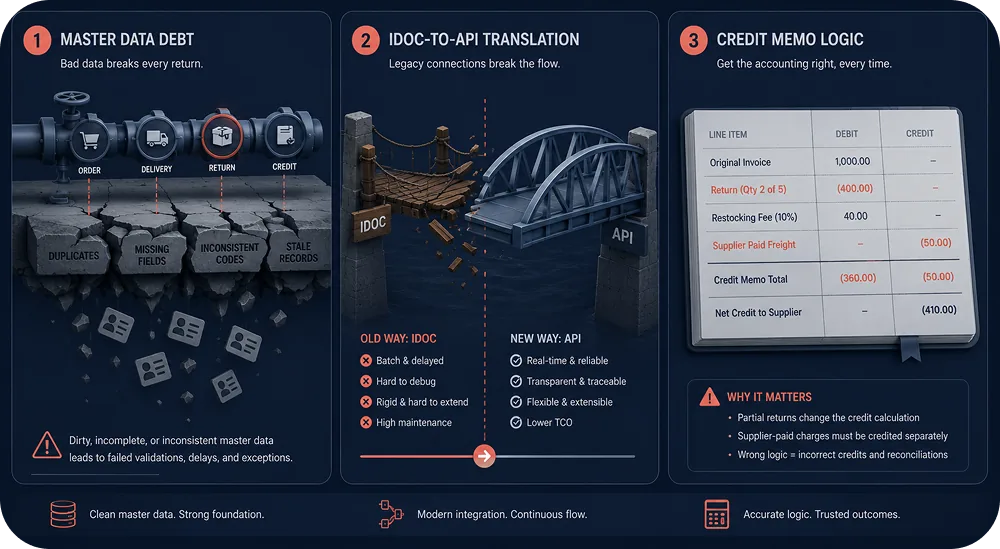
Brands moving from ECC to S/4HANA often discover the returns process is where the migration project actually stalls. Three issues recur.
Master data debt resurfaces. ECC tolerated dirty material masters because the standard returns flow was forgiving. S/4HANA's enforced business logic exposes every inconsistency: missing warranty terms, mismatched units of measure, duplicate sold-to records, inactive ship-to addresses still attached to live customers. Brands that planned a four-week returns migration end up running 10 to 14 weeks because the data cleanse takes longer than the technical move. The fix is to run a returns-specific master data audit before the migration kicks off, not as part of it.
IDoc-to-API translation is not free. Teams assume the existing IDoc-based integrations carry over. They do not. S/4HANA prefers OData and REST APIs for new builds, and the IDoc compatibility layer behaves differently for SD returns documents than for sales orders. Returns tools built for ECC need explicit re-mapping for the S/4HANA API surface. Plan a 2 to 4 week integration rework even if the original integration was "working".
Credit memo logic changes around revenue recognition. ECC was loose on which GL accounts could receive return-side postings. S/4HANA enforces tighter revenue recognition rules, which can break credit memos for partial returns, exchange-with-difference, and warranty-paid-by-supplier flows. Finance teams flag this late if returns workflows are not part of the migration test plan. Add explicit test cases for each return reason code before go-live.
The safer pattern is to migrate the returns workflow tool first to a system that abstracts the ERP differences, then move the ERP underneath without disrupting customers. The how to avoid costs of new system rollout piece covers the wider rollout discipline.
What Finance Wants From the Returns Workflow
Finance is the silent stakeholder in most returns operations. They do not file tickets, they do not sit in the support standup, but they care more than anyone about three things: revenue recognition accuracy, AR clearing speed, and supplier credit memo timing. The returns workflow tool either helps with all three or quietly creates work for the finance team that nobody sees.
Revenue recognition accuracy. Every refund or replacement triggers a revenue reversal. If the credit memo posts before the goods are actually returned, revenue is overstated for that period. If goods are received before the credit memo posts, accruals get messy. The pattern that works is event-driven: credit memo creation is gated on goods receipt confirmation, and both events flow into SAP from the returns tool in the right order.
AR clearing speed. Customer credit memos need to clear against the original invoice quickly. Manual reconciliation is the most common reason finance teams complain about returns volume. A clean integration posts the credit memo with the original invoice reference, and AR auto-clears.
Supplier credit memo timing. When a claim is supplier-eligible, the brand is owed a credit note. If the returns tool tracks supplier credit status alongside customer credit status, finance sees a clean ageing report. If it does not, finance discovers six months later that €400k in supplier credit was never recovered.
The supplier recovery piece and the returns adjusted profitability piece cover the wider finance angle.
B2B Side: Customer Returns vs Supplier Returns
SAP distinguishes between customer returns (from end customers or retail buyers) and supplier returns (back to vendors). Both flow through different document types and approval logic.
For B2B ecommerce running through SAP, the supplier return side often produces more friction than the customer side. The supplier recovery guide, the supplier chargebacks piece, and the how to simplify B2B returns piece walk through what good supplier-side looks like. The B2B industry page covers the wider B2B context. F. Engels runs a B2B-heavy setup with this split, see the F. Engels case study.
G2 Recognition
Claimlane's G2 reviews include operations leaders at SAP-shop ecommerce brands describing the integration setup and the daily savings on credit memo accuracy.
Reference Reads for SAP-Shop Ops
The return management software overview covers the wider category. The what is a returns management system piece covers the basics for teams new to the topic. The RMA explainer covers RMA terminology specifically, which maps to the SAP RE document type. The warranty management best practices guide covers the broader ops playbook this guide sits within. The Aftership alternatives guide covers tracking, which is a separate decision from SAP integration but often a parallel one.
For more brand examples beyond Coolshop, the Mads Nørgaard strategy case study covers an apparel brand's approach to balancing ERP and customer-side tools.
FAQ
What is the SAP transaction code for creating a return order? +
Does SAP support warranty management out of the box? +
Should we use SAP for the customer return portal? +
What is the difference between SAP ECC and S/4HANA for returns? +
How long does it take to integrate SAP with a returns tool? +
Conclusion
SAP's return order processing is a solid financial backbone. It is not a complete ecommerce returns and warranty operation, and most brands stop trying to make it one. The working pattern is SAP for the financial documents (return order, goods receipt, credit memo, GL posting), and a dedicated returns and warranty tool for everything customer-facing, supplier-facing, and AI-driven.
Claimlane runs that customer-facing layer for brands like Coolshop and posts structured return orders and credit memos back into SAP. Book a walkthrough at /book-demo to see the integration in action.



