
.webp)
Returns generate financial transactions. Every refund, exchange, credit memo, store credit issuance, and supplier chargeback needs to be recorded, reconciled, and reported. When the returns system and the ERP operate independently, someone has to manually bridge the gap.
That manual bridge is where errors happen. A credit memo gets created in the ERP but the return is not marked as processed in the returns system. A supplier chargeback is approved in the claims platform but never posted to the general ledger. A store credit is issued but the financial liability is not recorded.
ERP integration for returns management connects the claims and returns platform directly to the financial system. When a return is processed, the financial transaction flows automatically. No manual data entry. No reconciliation gaps.
This article covers how ERP integration works for returns, which financial transactions matter most, and what to look for in an integration.
- Returns generate financial transactions (refunds, credit memos, chargebacks) that must be recorded in the ERP. Manual entry is slow, error-prone, and does not scale.
- Direct integration between the returns platform and the ERP automates credit memo creation, refund posting, supplier chargeback tracking, and financial reconciliation.
- The most common ERP integrations for returns are Microsoft Dynamics 365 Business Central, SAP, and NetSuite.
- Claimlane integrates with 75+ systems including ERP, ecommerce, and shipping platforms, automating the financial side of returns and warranty claims.
Why Returns Need ERP Integration
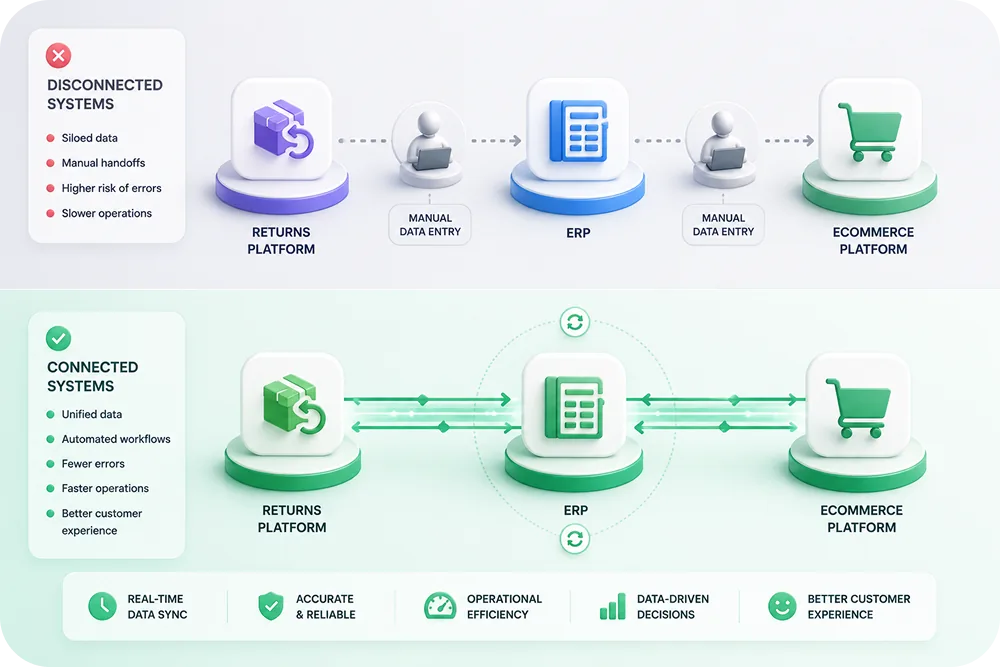
Returns are not just a logistics problem. They are a financial problem that touches multiple areas of the business.
Revenue recognition
When a customer returns a product, the revenue from that sale needs to be reversed. If the return is an exchange, the new sale needs to be recorded. If it is store credit, a liability needs to be created. These entries must happen in the ERP for accurate financial reporting.
Accounts payable and receivable
B2B claims generate credit memos that affect accounts receivable. Supplier chargebacks create entries in accounts payable or receivable depending on the direction. Without integration, these entries require manual posting.
Inventory accounting
Returned inventory needs to be valued correctly. A product returned in sellable condition goes back into inventory at its original cost. A product returned as defective may need to be written down. The ERP needs this data to maintain accurate inventory valuation.
Tax implications
Refunds and credit memos have tax implications. Sales tax collected on the original transaction may need to be reversed. Cross-border returns add customs duty refund eligibility. The ERP handles tax calculations, so it needs the return data.
Financial Transactions Generated by Returns
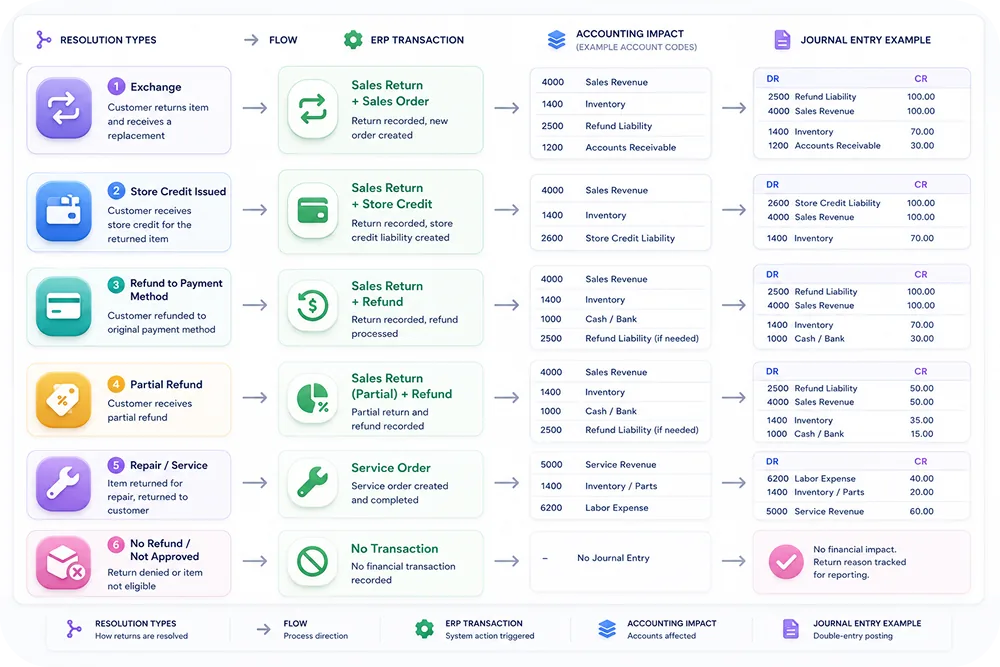
Every return resolution type creates specific financial transactions that the ERP needs to process.
Refund transactions
A customer refund involves: revenue reversal on the original invoice, payment refund to the customer's payment method (coordinated with the payment gateway), sales tax adjustment, and inventory receipt (if the product is returned). The ERP needs to record all of these.
Credit memo transactions
For B2B returns, instead of a direct refund, the brand issues a credit memo in the ERP. The credit memo reduces the retailer's outstanding balance. This is the standard process in wholesale and distribution. Automating credit memo creation from approved claims saves significant accounting time.
Supplier chargeback transactions
When a defect is the supplier's responsibility, the brand issues a chargeback. This creates a debit memo in the ERP against the supplier's account. Claimlane's forward-to-supplier feature packages the claim evidence; the ERP integration posts the financial transaction.
Store credit transactions
Store credit issuance creates a financial liability. The brand owes the customer a future product. When the store credit is redeemed, the liability is cleared and a new sale is recorded. The ERP tracks this liability over time.
Warranty reserve adjustments
Brands that maintain warranty reserves (a common accounting practice for products with warranty obligations) need to adjust these reserves based on actual claim volumes and costs. The claims platform provides the data; the ERP records the adjustments.
Common ERP Integrations for Returns
Microsoft Dynamics 365 Business Central
Business Central is the most common ERP for mid-market ecommerce brands, especially in Europe and Scandinavia. The integration with Claimlane automates sales credit memo creation, inventory receipt posting, and customer ledger entries when returns are processed.
Key integration points:
- Sales return orders created from approved claims
- Credit memos posted automatically
- Item journal entries for returned inventory
- Vendor claim entries for supplier chargebacks
SAP
SAP is standard for enterprise brands. The returns integration handles credit memo requests (VF11), goods receipt for returned products (MIGO), and quality notifications (QM) for defect tracking. Claimlane's integration maps claim data to SAP document types.
NetSuite
NetSuite combines ERP and ecommerce. The integration creates return authorizations, posts credit memos, and updates inventory in a single transaction. For brands already on NetSuite, the returns integration is one of the simpler ERP connections.
Other systems
"The integration between Claimlane and our ERP has eliminated hours of manual data entry. Claims flow through to credit memos automatically, and our finance team has full visibility."
Setting Up ERP Integration for Returns
Step 1: Map financial transactions to claim resolutions
Document every type of return resolution the brand offers (refund, exchange, store credit, repair, supplier chargeback) and the corresponding financial transaction in the ERP. This mapping is the foundation of the integration.
Step 2: Define data flow direction
The integration is typically bidirectional:
- Claims platform to ERP: Approved resolutions trigger financial transactions (credit memos, refund entries, inventory adjustments).
- ERP to claims platform: Order data, product information, and customer records flow from the ERP to the claims platform for claim validation.
Step 3: Configure automation rules
Not every claim should automatically create an ERP transaction. Define which claims auto-post (e.g., low-value approved refunds) and which require manual approval before the financial entry is created (e.g., high-value credit memos, supplier chargebacks).
Claimlane's workflow engine handles this with configurable approval rules. When a claim is approved, the integration triggers the appropriate ERP transaction based on the resolution type and value.
Step 4: Set up reconciliation checks
Build automated checks that compare claim volumes in the returns platform with financial entries in the ERP. Any discrepancy (a claim marked as processed but no corresponding credit memo) should trigger an alert.
Step 5: Test with real data
Run parallel processing for 2-4 weeks: process returns through both the automated integration and the existing manual process. Compare results to catch mapping errors, missing transaction types, or data format issues.
Automating Credit Memo Creation
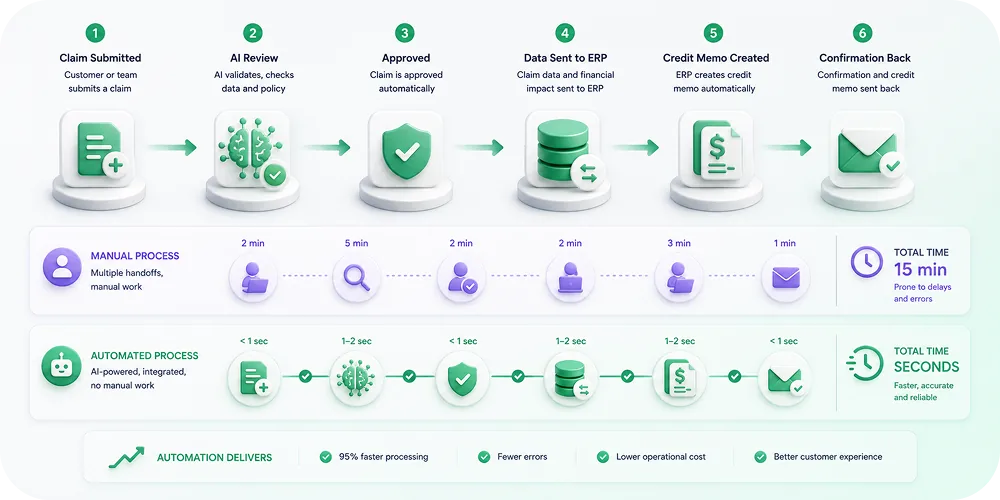
Credit memo automation is often the highest-value part of ERP integration for returns. Here is how it works:
- A customer or retailer submits a claim through the self-service portal.
- The claim is reviewed (by Claimlane's AI Agent or a human agent) and approved.
- The integration sends the approved claim data to the ERP: customer/retailer ID, original order reference, product details, return reason, and resolution amount.
- The ERP creates a credit memo linked to the original invoice.
- The credit memo is posted, updating the customer's balance and the general ledger.
- The returns platform receives confirmation that the financial entry is complete.
This process takes seconds through automation. Manual creation typically takes 10-15 minutes per credit memo and is prone to reference errors, amount discrepancies, and posting delays.
Supplier Chargeback Integration
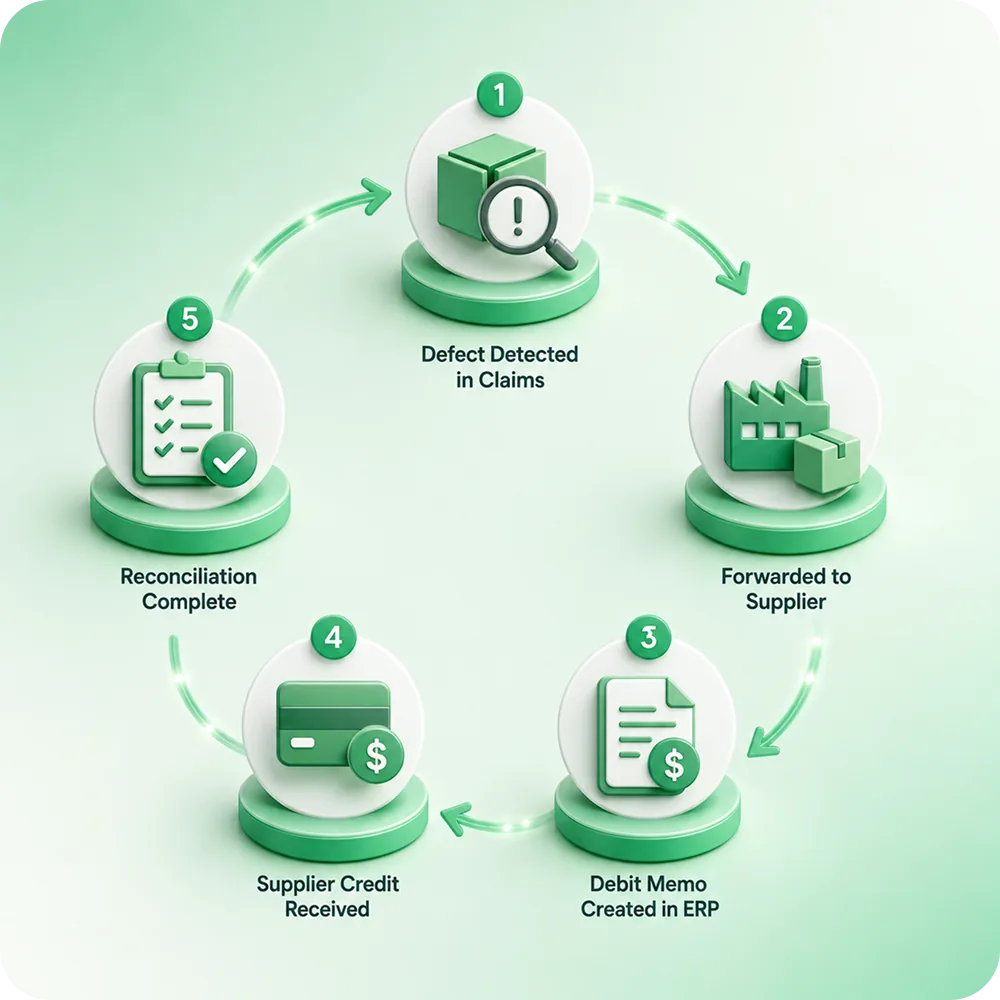
When a product defect is the supplier's responsibility, the brand needs to recover the warranty cost. Supplier chargebacks require documentation, financial entries, and tracking.
Claimlane's forward-to-supplier feature handles the documentation side: packaging claim photos, defect descriptions, and serial number data. The ERP integration handles the financial side: creating a debit memo against the supplier's account, tracking the chargeback status, and reconciling when the supplier issues a credit or payment.
This is where warranty analytics and ERP integration intersect. The claims platform identifies defect patterns and attributes them to suppliers. The ERP integration creates the financial transactions to recover costs. Together, they form a complete supplier recovery process.
Returns Reporting and Financial Analytics
With integrated data, finance teams can generate reports that combine return operations data with financial outcomes.
Cost of returns
Total financial impact of returns: refund amounts, reverse logistics costs, restocking labor, write-offs for unsellable items, and warranty reserve consumption. This data comes from both the returns platform and the ERP.
Supplier cost recovery
Percentage of warranty costs recovered from suppliers through chargebacks and credit notes. Track this by supplier, product category, and time period.
Revenue retention
Percentage of return value retained through exchanges and store credit. Compare this with refund rates to measure the effectiveness of exchange-first strategies.
Warranty liability tracking
Outstanding warranty obligations and reserve adequacy. The ERP tracks the financial reserve; the claims platform provides actual claim rates for forecasting.
Claimlane's analytics dashboard provides the operational view. The ERP provides the financial view. Integration connects both perspectives.
How Claimlane Integrates With ERP Systems
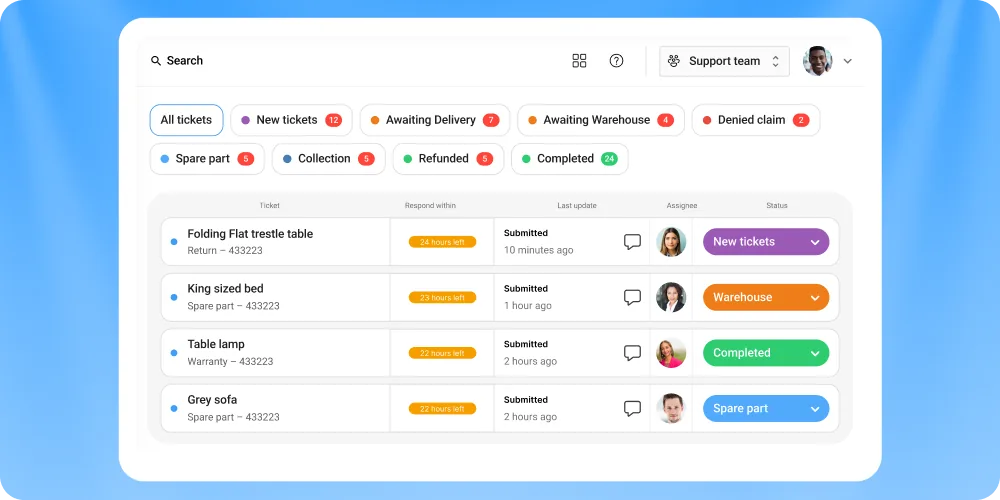
Claimlane was built to work alongside ERP systems, not replace them. The platform handles the claims and returns workflow; the ERP handles the financial recording.
Bidirectional data flow
Order data, product catalogs, and customer records flow from the ERP into Claimlane for claim validation. Approved resolutions flow back as credit memos, inventory adjustments, and supplier transactions.
Pre-built connectors
Claimlane's integrations include pre-built connectors for Business Central, SAP, NetSuite, Shopify, WooCommerce, and more. These connectors handle the mapping between Claimlane's claim data and the ERP's transaction formats.
AI-powered claim processing
Claimlane's AI Agent reviews claims and approves resolutions before they reach the ERP. This means only validated, correctly categorized claims generate financial transactions, reducing errors and manual corrections.
Audit trail
Every claim, approval, and financial transaction is logged. The audit trail spans both Claimlane and the ERP, providing full traceability for internal and external audits.
Claimlane is rated 4.8/5 on G2.
"We chose Claimlane because it integrates with our existing systems. The claims data flows into our ERP without manual intervention, and our finance team spends less time on reconciliation."
Common ERP Integration Mistakes
Not mapping all resolution types
Every resolution type needs a corresponding ERP transaction. Missing one (e.g., store credit issuance) creates a gap that requires manual intervention every time that resolution is used.
Ignoring currency handling
For international returns, the claim may be in one currency and the ERP transaction in another. The integration needs to handle exchange rate conversion and multi-currency posting.
No error handling
When an ERP transaction fails (invalid customer reference, closed accounting period, missing product code), the integration needs to queue the transaction and alert the team. Without error handling, failed transactions are silently lost.
Skipping reconciliation checks
Even with automation, run monthly reconciliation between the claims platform and the ERP. Compare total claims processed vs. total financial entries posted. Discrepancies indicate integration issues.
Not involving finance in the setup
The IT team may configure the integration, but the finance team defines the accounting requirements. Involve finance from the start to ensure the correct chart of accounts mapping, posting periods, and approval workflows.
FAQ
Conclusion
Returns management and financial management are two sides of the same coin. Without ERP integration, the gap between them creates manual work, data errors, and reporting blind spots.
The brands that connect their claims platform to their ERP automate credit memos, track supplier chargebacks with precision, and produce financial reports that reflect the true cost and opportunity in their returns operations. Claimlane provides the integration layer that makes this connection seamless.
Book a demo to see how Claimlane integrates with your ERP for returns management.



