

Using Dynamics 365 for warranty management is something a lot of businesses end up doing. When it’s set up well, it brings much-needed structure and visibility to a process that often feels messy and hard to control.
In this post, we’ll cover:
- What Dynamics 365 can do for your warranty management
- What Dynamics 365 can't do for your warranty management
- How to get started with warranty management inside Dynamics 365 using Claimlane
If you’re dealing with growing claim volumes, unclear rules, or too much manual work, this should help you make sense of the path forward.
What Dynamics 365 Does Well for Warranty Management
Microsoft Dynamics 365 is a strong foundation for warranty operations, especially if you already use it for CRM, finance, or service.
Dynamics 365 shines when it comes to:
- Centralized customer and asset data
- Case management and workflow automation
- Tight integration with finance and ERP
- Reporting across departments
From a data and process perspective, it makes sense to anchor warranty management here.
How to get started with Dynamics 365 for warranty management
You usually have three options on how to get started with Dynamics 365 for warranties.
Regardless of which ERP you use, the fundamentals stay the same. Here's a complete guide to warranty claims processing from start to finish.
1. Use a dedicated warranty system integrated with Dynamics 365 (best option)
For most companies, this is the smartest place to start
A dedicated warranty platform like Claimlane is built specifically for handling warranty claims, rules, validations, approvals, and reporting. Dynamics 365 remains your system of record for customers, assets, and finance, while Claimlane handles the heavy warranty logic.
Why this works so well
- Warranty rules are already built for real-world complexity
- Integrates directly to Dynamics 365
- Faster implementation with far less custom work
- Easier to scale as claim volume and rules grow
- Fewer long-term surprises and hidden costs
Want to hear more: Book a meeting with Claimlane and hear more.
2. Pay a consultant to build it for you (works, but risky)
Hiring a Dynamics 365 consultant sounds like a safe middle ground. In reality, it often creates long-term dependency.
Consultants typically customize Dynamics to mimic warranty functionality. It works at first, but problems tend to show up later.
Common issues
- High upfront project costs
- Ongoing changes require more consulting hours
- Warranty expertise is often limited
- Knowledge walks out the door when the project ends
You may end up with a solution that only the original consultant fully understands. That makes future improvements slow and expensive.
This option can work, but it is rarely cost-effective over time.
3. Build it yourself inside Dynamics 365 (usually the worst option)
This is the most tempting option and the one companies regret the most.
Building warranty management yourself means creating custom tables, workflows, rules, and reports from scratch. What looks simple at the beginning quickly becomes fragile.
Why this often fails
- Warranty logic is more complex than expected
- Internal teams become bottlenecks
- Small changes require disproportionate effort
- Maintenance never really ends
Unless you have a large, experienced Dynamics team and very simple warranties, this approach drains time and focus from more important work.
Dynamics 365 isn't the only ERP with warranty capabilities. See how NetSuite handles warranty and repairs management and how it compares.
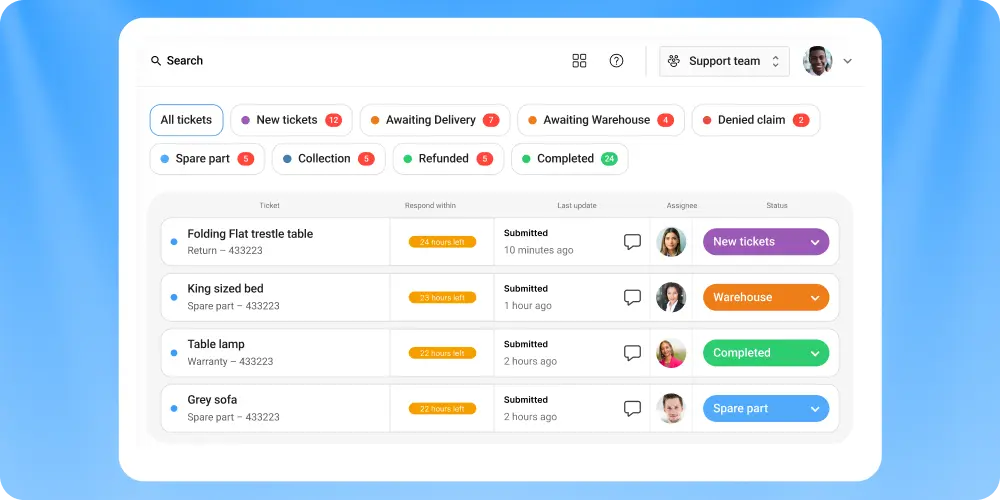
How to integrate Dynamics 365 with Claimlane
Instead of forcing Dynamics 365 to become something it isn’t, many teams take a lighter approach.
They keep Dynamics 365 as the system of record, while integrating a purpose-built warranty platform to handle the hard parts. This reduces risk, shortens timelines, and keeps upgrades manageable.
This is where Claimlane comes in.
Claimlane is Warranty Management Software designed specifically for warranty claims, not as a generic add-on.
Positioned as an integrator, Claimlane:
- Handles warranty-specific logic and workflows
- Automates claim intake, validation, and approvals
- Supports supplier recovery and cost tracking
- Connects cleanly back to Dynamics 365
The result is a split that makes sense. Claimlane runs the warranty engine. Dynamics 365 stays the backbone for customers, finance, and reporting.
Claimlane already has a dedicated Dynamics 365 integration, making it fast and easy to set up. Interested? Reach out right here.
Final Takeaway
Dynamics 365 is a solid platform for warranty management, but it doesn’t need to do everything itself. The fastest, least risky path is often pairing it with a system built specifically for warranty claims.
Using Claimlane as the integrator lets you move quickly, keep Dynamics clean, and finally bring order to a process that tends to spiral as the business grows.
Warranty management looks different depending on your industry. If you're in the automotive space, here's a specific guide on dealership warranty management and the unique challenges it brings.
FAQs
Can Dynamics 365 handle warranty management on its own?
Dynamics 365 can support customer data, assets, workflows, and finance, but it does not include native warranty claim logic. Most companies end up adding a dedicated warranty system or heavy customizations once claim volume and rules increase.
What are the main limitations of using Dynamics 365 for warranty claims?
The biggest gaps are warranty rule validation, automated entitlement checks, approvals, and supplier recovery. These gaps often lead to manual work or complex custom builds.
Is it better to customize Dynamics 365 or integrate a warranty platform?
For most teams, integrating a purpose-built warranty platform is faster, less risky, and easier to scale than building everything inside Dynamics 365.
How does Claimlane work with Dynamics 365?
Claimlane handles warranty-specific processes like claim intake, validation, approvals, and supplier recovery, while Dynamics 365 remains the system of record for customers, assets, and finance.
Who should consider using Claimlane with Dynamics 365?
Companies with growing claim volumes, complex warranty rules, or too much manual work benefit the most. It’s especially useful when Dynamics 365 is already in place but struggling to scale for warranties



