

In the fast-paced world of ecommerce, smooth operations are the backbone of success. Managing your business across multiple platforms can be a logistical challenge, but with the right tools, it doesn’t have to be. Enter Business Central Shopify Integration, a powerful solution that connects your Shopify store with Microsoft’s Business Central, the leading ERP system for small to medium-sized businesses.
By combining these two platforms, you can seamlessly sync your ecommerce store with your financial, inventory, and order management systems, all while automating tedious manual processes. Whether you're handling returns, warranties, or managing inventory, this integration will ensure everything works together in perfect harmony.
In this blog post, we’ll walk you through how Business Central Shopify integration can streamline your ecommerce operations, enhance customer experience, and improve efficiency. Let’s dive in!
TL;DR: Integrating Shopify with Microsoft Dynamics 365 Business Central keeps orders, inventory, returns and financial data synchronized automatically. It removes manual work, prevents stock errors and speeds up return and warranty handling. Adding Claimlane on top of the integration automates return orders, credit notes and warranty workflows for faster and more accurate after-sales operations.
What Is the Business Central Shopify Integration for Ecommerce?
Connecting Two Powerful Platforms
Business Central is a comprehensive ERP system from Microsoft Dynamics 365 designed to simplify and automate business processes like finance, supply chain management, sales, and customer service. Shopify, on the other hand, is a top-tier ecommerce platform that enables businesses to set up and manage their online stores.
The Business Central Shopify Integration combines the best of both worlds, allowing businesses to connect Shopify with Business Central. This integration allows for automatic data synchronization between both systems, ensuring that inventory, order details, invoices, and customer information are always up to date.
Benefits of the Business Central Shopify Integration
Integrating these two platforms brings several advantages to your ecommerce business:
- Streamlined Operations: Automate data transfer between Shopify and Business Central, reducing the need for manual entry.
- Improved Inventory Management: Automatically update inventory across systems, ensuring accurate stock levels.
- Seamless Order Processing: Sync orders between Shopify and Business Central for a smooth fulfillment process.
- Better Financial Tracking: Automatically sync sales, returns, and refunds with Business Central, ensuring accurate financial records.
- Reduced Errors: Minimize the risk of manual errors by automating repetitive tasks.
If your team uses Salesforce alongside Shopify, the right integrations can bridge the gap between sales and support. Here are the best Salesforce integrations for 2026.
Improve Ecommerce After-Sales with Business Central and Shopify
Inventory Management Made Easy
One of the biggest challenges in ecommerce is managing inventory. With Business Central Shopify integration, you no longer have to worry about discrepancies between your online store and your warehouse. The integration ensures that stock levels in both Shopify and Business Central are always up to date.
Key Features for Inventory Management:
- Real-Time Stock Updates: Automatically sync inventory levels between Business Central and Shopify.
- Product Syncing: Ensure product data (prices, descriptions, and images) are consistent across both platforms.
- Order Fulfillment Sync: When an order is placed in Shopify, Business Central automatically updates the inventory, ensuring you never oversell.
This means you can focus on growing your business, knowing that your inventory management is automated and synchronized in real-time.
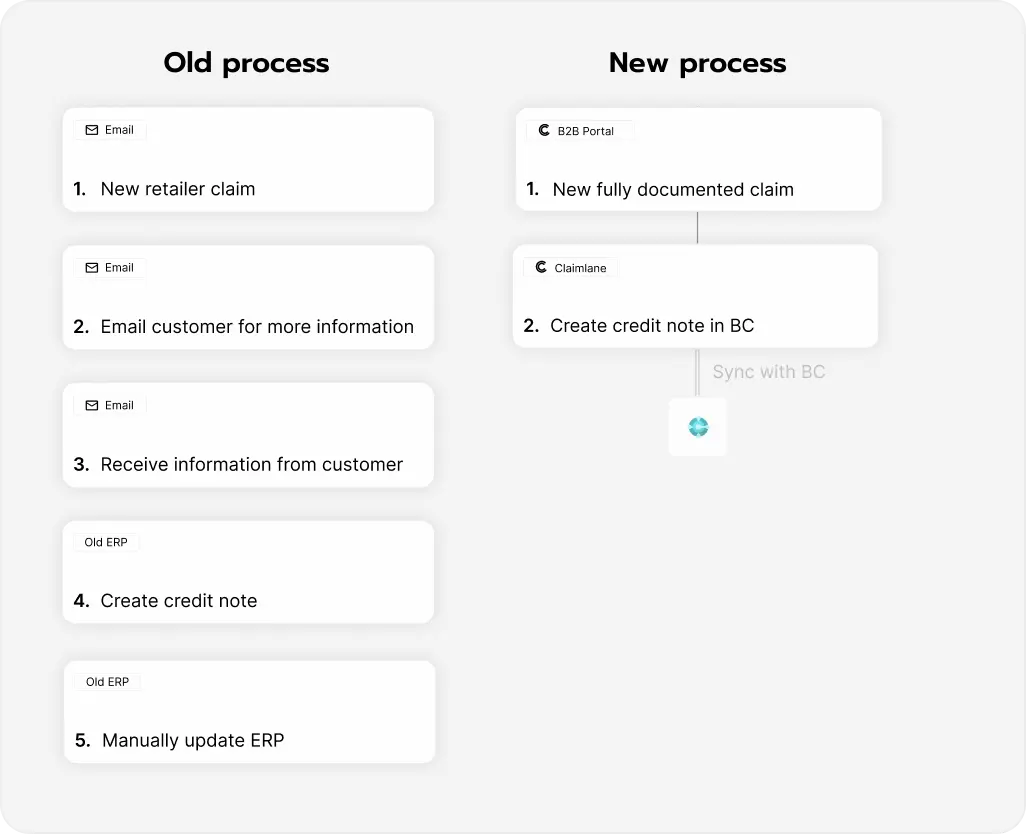
Automate Shopify Returns and Refunds with ERP Integration
Handling Shopify returns can be time-consuming, especially when you’re managing a large volume of orders. But with Business Central integration, you can automate the process, making returns and exchanges much easier to handle.
Benefits of Automating Returns:
- Automated Return Orders: When a customer initiates a return on Shopify, the system automatically generates a return sales order in Business Central.
- Credit Notes: Once a return is processed, a credit note is automatically generated in Business Central, reducing manual work and the chance for errors.
- Replacement Orders: If a customer opts for a replacement instead of a refund, Business Central can automatically create the replacement order.
By integrating Claimlane, a returns management system, with Business Central, you can further enhance this process by tracking return statuses in real-time and syncing the results automatically with both Shopify and Business Central.
How do I sync Shopify inventory with Business Central?
Using a tool like Claimlane, you can integrate Shopify and Business Central, to ensure that all returns and claims automatically update your ERP. This keeps product data and finacials automatically updated.
For brands using Gorgias for customer support, connecting it to your ERP and storefront is key. Check out the best Gorgias integrations for ecommerce in 2026.
Optimizing Shopify Warranty and Product Returns
Handling ecommerce warranty claims is another area where Business Central and Shopify integration can save you time and money. By syncing warranty data between both platforms, you can easily manage warranty claims and returns without manually searching for invoice details or product information.
Key Warranty Management Features:
- Warranty Claims Integration: Automatically track warranty claims through Shopify and Business Central.
- Invoice Matching: Business Central allows you to match warranty claims to specific invoices, ensuring the process is smooth and error-free.
- Automated Credit and Replacement Orders: Similar to returns, warranty claims can automatically trigger credit notes and replacement orders.
With all this automation in place, you can offer a better customer experience while ensuring your accounting is always up to date.

Setting Up Business Central Shopify Integration
Setting up Shopify Business Central integration may sound like a daunting task, but it’s easier than you might think. The integration process typically involves installing a connector app that facilitates communication between the two platforms. Let’s walk through the process step by step:
Step 1: Choose the Right Connector
First, you’ll need to select a Shopify connector for Business Central. Several third-party apps are available that connect Shopify with Business Central, and they all have different features. One such solution is the Claimlane app, which is designed specifically for integrating returns, warranties, and other after-sales processes between Shopify and Business Central.
Step 2: Install the Connector
Once you've selected the right connector, it’s time to install it on both your Shopify and Business Central accounts. The connector will allow the two platforms to communicate and share data in real time. For most integrations, you won’t need any coding skills—just follow the guided installation process.
Step 3: Configure the Integration
After installing the connector, the next step is to configure it to meet your specific business needs. This includes:
- Mapping your products, inventory, and customer data between Shopify and Business Central.
- Setting up the synchronization rules for orders, returns, and inventory levels.
- Configuring automatic updates for invoices, returns, and credit notes.
Step 4: Test the Integration
Before going live, it’s important to test the integration thoroughly. Make sure all data syncs properly, and that orders, returns, and inventory are accurately reflected in both systems. You can run a few test transactions to ensure everything works smoothly.
Step 5: Go Live and Enjoy the Benefits
Once you’re confident the integration is working correctly, it’s time to go live. From here on out, your Shopify and Business Central integration will run in the background, automating your processes and allowing you to focus on what matters most—growing your ecommerce business.
Integrations are only as useful as the systems they connect. Here's a primer on order management systems and how they tie everything together.
Why integrate Business Central and Shopify?
You might be wondering: why is Business Central the right choice for my Shopify store? Here are a few reasons why integrating Business Central with Shopify is a smart move:
- Centralized Data Management: Keep all your business data in one place for easy access and analysis.
- Automation: Save time and reduce human error by automating tasks like inventory updates, order processing, and return management.
- Scalability: As your business grows, Business Central scales with you, offering more advanced features as needed.
- Customer Experience: A seamless integration improves customer satisfaction by ensuring faster and more accurate order processing, returns, and warranty claims.
Common Mistakes When Connecting Shopify With Business Central
Even with a solid integration, businesses can run into avoidable issues. Here are the most frequent mistakes that slow down operations or create inconsistent data.
1. Incomplete Product Mapping
If products aren’t mapped correctly between Shopify and Business Central, orders won’t sync as expected. This often leads to stuck orders, failed updates or missing inventory adjustments.
2. Not Syncing Variants Properly
Many ecommerce stores rely on variants for sizes, colours or models. Incorrect variant mapping results in incorrect stock counts or misrouted orders.
3. Handling Returns Outside the Integration
Some teams still process returns or exchanges manually by email. This breaks the sync and causes mismatched financials in the ERP.
4. Ignoring Test Transactions
Going live without test orders, test returns and test credit-note flows often leads to surprises during peak sales periods.
5. Using Multiple Tools for the Same Workflow
If different teams use separate tools for returns, warranty handling and inventory adjustments, data becomes fragmented. Keeping everything routed through Business Central avoids confusion.
6. No Standard Process for Warranty Cases
Warranty claims often fall outside typical return flows. Without a structured process, teams waste time searching for order details or manually creating replacement orders.
Avoiding these mistakes ensures a smoother integration and more predictable day-to-day operations.
The Business Central Shopify Integration is a game-changer for ecommerce businesses looking to streamline operations, enhance customer experience, and reduce manual workload. By connecting Shopify with Business Central, you can automate everything from order fulfillment to returns management, ensuring everything runs smoothly without the hassle.
At Claimlane, we specialize in making the Business Central Shopify integration process as seamless as possible. Whether you’re handling ecommerce returns or managing warranty claims, our integration helps you save time and reduce errors.
Ready to take your ecommerce operations to the next level? Get started with Claimlane’s Business Central integration today and see the difference it can make for your business!
Click here to learn more and start automating your returns process with Claimlane!
FAQ
What are the benefits of integrating Business Central with Shopify?
The integration keeps orders, inventory and financials aligned automatically. Using a connector like Claimlane, returns and warranty outcomes update your ERP without manual work.
Is there a Shopify app for Microsoft Dynamics 365?
Yes. Tools like Claimlane and Microsoft’s own connector can link Shopify with Business Central.
How can I automate returns and credit notes in Shopify?
By connecting Shopify and Business Central with a tool like Claimlane, you can automate return orders, credit notes and replacement orders while keeping your ERP updated.



