
.webp)
ERP systems manage the financial and operational backbone of a business. But when it comes to returns and warranty claims, most ERPs fall short. They can process a credit memo and adjust inventory, but they cannot collect defect photos from customers, route claims to the right team, analyze warranty eligibility, or coordinate repairs with suppliers.
That gap creates a disconnected experience. Customer service handles the claim in one system. Finance processes the refund in another. Warehouse updates inventory in a third. Data gets lost between handoffs, refunds are delayed, and nobody has a complete view of the return.
The fix is not replacing the ERP. It is connecting it to a purpose-built returns and warranty platform that handles the customer-facing workflow and syncs back to the ERP for financial and inventory actions. This guide ranks the best ways to connect ERP systems to returns management in 2026.
- ERPs handle finance and inventory but lack customer-facing returns workflows, AI claim analysis, and supplier coordination.
- The best approach connects a dedicated returns platform to the ERP, not the other way around.
- Key integration points: credit memo creation, inventory adjustments, order data sync, and shipping triggers.
- Claimlane integrates with Business Central, SAP, and other ERPs to automatically trigger financial actions when claims are resolved.
Comparison Table
| Integration | ERP Systems | Returns Focus | Key Strength | Pricing |
|---|---|---|---|---|
| Claimlane + ERP ★ | BC, SAP, custom | Warranty + returns | AI claims + auto ERP sync | Custom |
| Celigo | NetSuite, SAP, Dynamics | General | Pre-built flows | From $600/mo |
| Boomi | Any major ERP | General | Enterprise iPaaS | Custom |
| ERP Native | Vendor-specific | Basic returns | No extra platform | Included |
Why Trust This Comparison
Claimlane integrates directly with ERP systems used by brands like Konges Sløjd (Business Central integration) and Coolshop (multi-system returns coordination). Rated 4.8/5 on G2.
Claimlane + ERP — Best for Returns and Warranty Integration
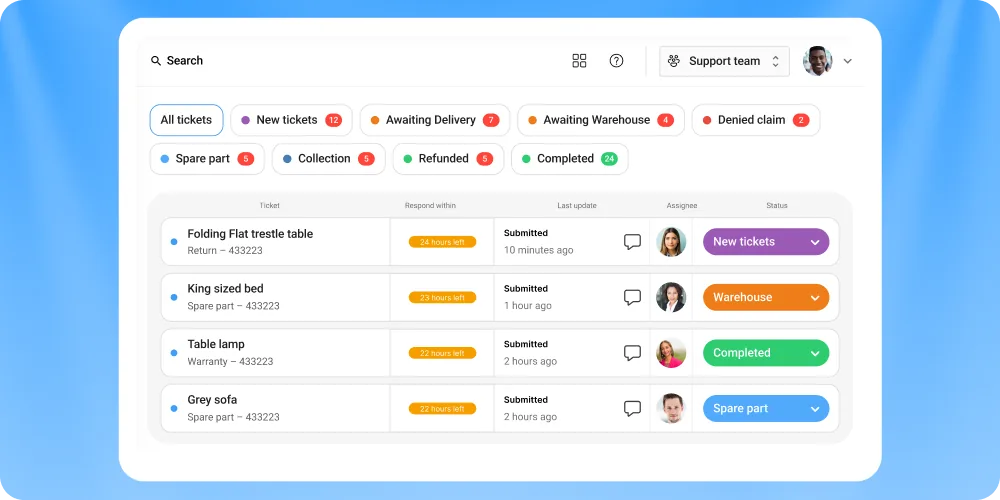
Claimlane connects to ERP systems to create a closed-loop returns and warranty workflow. The returns process lives in Claimlane (customer portal, AI triage, team workflows), while financial and inventory actions sync to the ERP automatically.
Why people choose Claimlane for ERP integration
- Resolving a claim in Claimlane automatically creates credit memos, adjusts inventory, and triggers shipping in the ERP
- AI Agent handles claim triage before anything touches the ERP, reducing manual data entry
- Self-service portal collects all claim data upfront, so the ERP receives clean, structured information
- Supports Business Central, SAP, and custom ERP connections
- Workflow automation ensures claims follow the right process before ERP actions fire
Pros and cons
Pros: Purpose-built for returns and warranty, automatic ERP sync, AI claim analysis, proven with Konges Sløjd's BC integration.
Cons: Requires ERP with API access. Not a standalone ERP module.
How the integration works
- Customer submits claim via self-service portal
- AI Agent analyzes the claim and recommends resolution
- Agent approves or adjusts the recommendation in Claimlane
- Claimlane syncs to ERP: credit memo created, inventory updated, shipping triggered
- Customer receives automated status updates
Pricing
Custom. Book a demo or try the interactive demo.
Why ERPs Alone Cannot Handle Returns
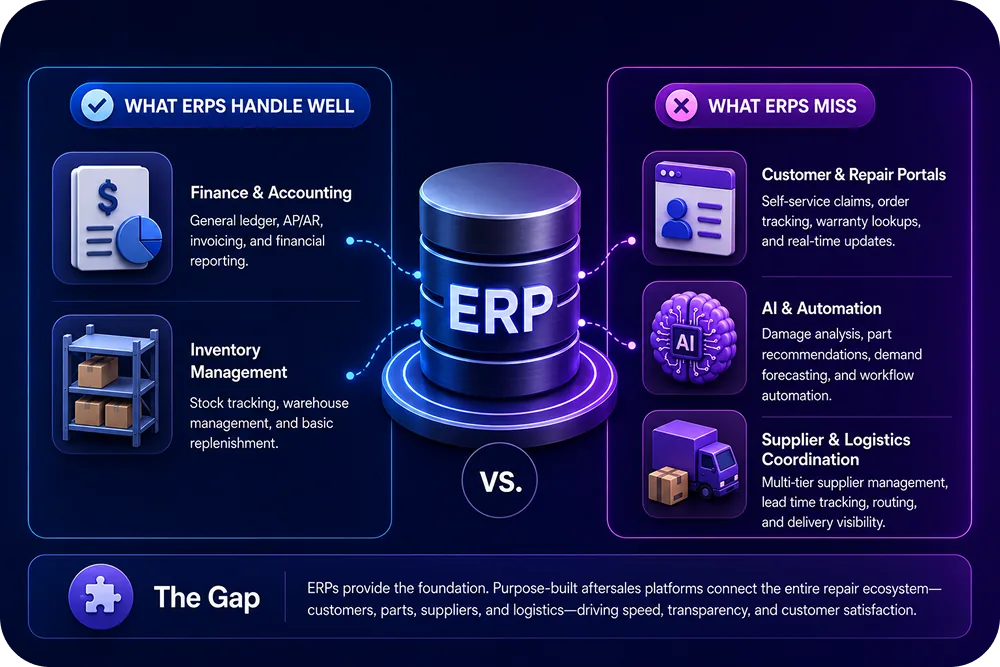
ERPs are built for structured financial transactions, not for the messy, customer-facing side of returns.
Missing customer-facing workflows
ERPs do not have self-service portals for customers to submit claims with photos, videos, and defect descriptions. The claim data has to be manually entered by support agents.
No AI-powered claim analysis
ERPs cannot look at a photo of a damaged product and determine warranty eligibility. AI-powered triage requires purpose-built models trained on product defect data.
No supplier coordination
When a warranty claim requires supplier involvement, ERPs offer no structured way to forward the claim with photos, customer details, and resolution recommendations. This typically happens via email, creating tracking gaps.
Limited analytics
ERP returns reports show financial data (refunds issued, inventory adjustments). They do not show operational data like claim resolution times, defect patterns, supplier performance, or customer experience metrics.
ERP-Specific Integration Approaches
Microsoft Dynamics 365 Business Central
Business Central is the most common ERP among Claimlane customers. The integration covers:
- Automatic credit memo creation when a refund is approved
- Inventory quantity adjustments for returned or replaced items
- Order data pull for claim validation
- Customer data sync for warranty verification
Konges Sløjd uses this integration so that resolving a claim in Claimlane triggers all downstream BC processes automatically.
SAP
SAP integrations typically use APIs or middleware (like Celigo or Boomi) to connect returns data. Key sync points:
- Return order creation in SAP when a return is approved
- Goods receipt posting when the item arrives at the warehouse
- Credit memo or replacement order generation
NetSuite
NetSuite users often pair the ERP with a middleware platform (Celigo is the most common for NetSuite) to connect returns workflows.
Celigo — Best iPaaS for NetSuite Returns
Celigo is an integration platform (iPaaS) with pre-built connectors for NetSuite and other ERPs. It does not handle returns itself but connects systems that do.
Pros: Pre-built NetSuite flows, visual integration builder, good for complex multi-system environments.
Cons: Not a returns platform. Requires a separate returns tool. Integration maintenance needed.
Pricing: From approximately $600/month.
Boomi — Best Enterprise iPaaS
Boomi (Dell Technologies) is an enterprise integration platform that connects any system to any other system via APIs.
Pros: Handles complex enterprise integration scenarios, any-to-any connectivity.
Cons: Expensive, requires technical resources. Not returns-specific.
Pricing: Enterprise custom.
ERP Native Returns Modules
Most ERPs include basic returns processing: create a return order, receive the goods, issue a credit. But these modules lack customer-facing portals, AI triage, photo collection, and supplier forwarding.
The article ERP vs. Dedicated Returns Management Software covers this comparison in detail.
What to Look for in an ERP Returns Integration
Automatic financial sync
When a return is approved, the ERP should automatically generate credit memos or replacement orders without manual entry.
Order data access
The returns platform needs to pull order details from the ERP so customers do not have to re-enter information.
Real-time inventory updates
Returned items should update ERP inventory in real time for accurate stock management.
Bidirectional sync
Data should flow both ways: order data from ERP to returns platform, and resolution data from returns platform back to ERP.
Error handling and logging
Integrations fail. The system needs retry logic, error alerts, and transaction logs for troubleshooting.



