.webp)
What dead on arrival means for ecommerce brands
A dead on arrival product is the worst version of a faulty item. The customer waited for the delivery, opened the box, and the product did nothing. No first impression, no use, just a fault. DOA cases carry more frustration than almost any other after-sales request, because the customer never got a single moment of value.
For brands and retailers, DOA is also an operational problem. A DOA case handled like a standard warranty claim sits in a repair queue for two weeks while the customer gets angrier. Handled well, it closes in days with a clean replacement. This guide covers what DOA means, how it differs from transit damage, the reporting window to set, and how to build a DOA claim flow that protects both the customer and the margin. For the wider picture, the ecommerce warranty guide sits next to this one.
- A dead on arrival product fails on first use, straight out of the box, before the customer gets any value from it.
- DOA is not the same as transit damage or a standard warranty claim, and treating all three the same slows every case.
- A fast DOA flow runs on a short reporting window, unboxing evidence, and a one-to-one replacement instead of a repair queue.
- Brands using Claimlane route DOA cases into their own lane, validate the serial at intake, and ship a replacement without the email back-and-forth.
DOA, transit damage, and standard warranty claims are not the same

Three faults look similar from a distance and need very different handling.
Dead on arrival means the unit itself never worked. The cause sits with the manufacturer or with handling before dispatch.
Transit damage means the unit was fine when it shipped and broke on the way. The cause sits with the carrier, which usually means a delivery exception and often a separate carrier claim. The damaged in transit claims guide covers that path in full.
A standard warranty claim covers a fault that shows up later, after the product worked for a while. That case runs on the warranty term and the brand's warranty rules.
| Dead on arrival | Transit damage | Standard warranty | |
|---|---|---|---|
| When the fault shows | First use, out of the box | Visible at delivery | Weeks or months later |
| Likely cause | Manufacturing defect or handling before dispatch | Carrier handling | Wear or component failure |
| Typical resolution | Fast one-to-one replacement | Replacement plus carrier claim | Repair or replacement per warranty rules |
| Evidence needed | Unboxing photo or video, serial | Photos of packaging and unit | Fault photos, description, purchase proof |
Treating all three the same is the most common mistake. It sends a DOA replacement into a repair workflow, asks for a receipt the customer should not need, and adds days to a case that should be quick.
Why DOA cases need their own claim lane
A DOA case has a different goal from a repair case. The customer does not want their unit fixed. They want a working unit, fast, because the one they paid for never worked. A shared queue cannot tell the two apart, so the DOA case waits behind repairs that are not urgent in the same way.
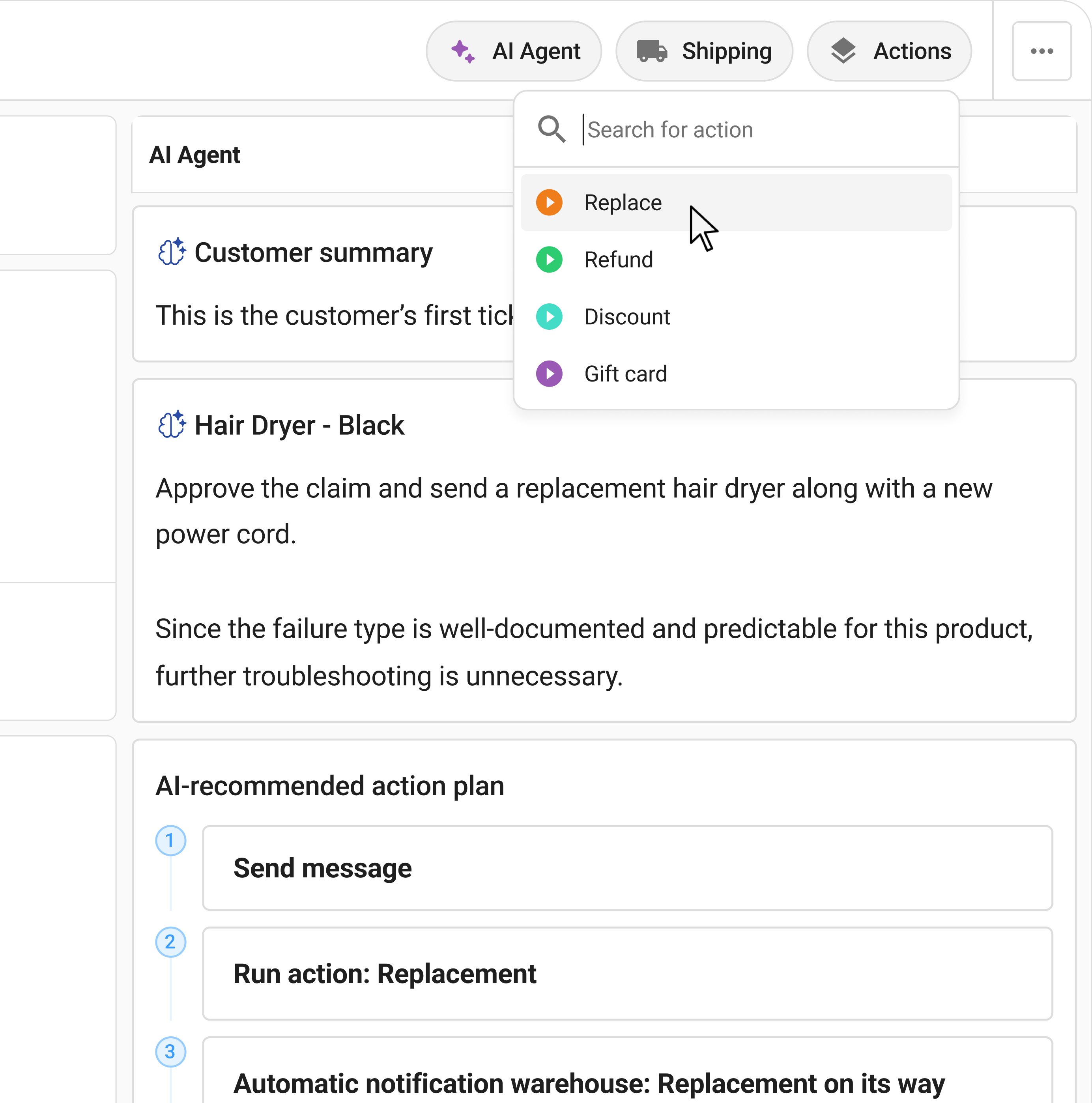
A dedicated lane fixes that. When the intake form flags a fault on first use, the case routes straight to a DOA path with its own steps and its own service target. The customer service workflows for returns guide covers how lanes split by case type, and Claimlane workflows let a brand set the DOA path once and run it on every matching case.
The lane also protects the data. DOA volume per SKU is a quality signal. Mixed into a general queue, that signal is lost. Kept separate, it tells the brand which products fail straight out of the box.
How long customers have to report a dead on arrival product

Most DOA policies set a short reporting window. Common windows run from 7 to 30 days from delivery, and some manufacturers stretch the DOA term to 90 days for higher-value goods. After the window closes, the case moves to standard warranty handling instead. The manufacturer warranty guide for consumer electronics covers how those terms are usually written.
A window of 14 to 15 days works for most categories. It gives the customer time to open and test the product, and it keeps the DOA claim close enough to delivery that the cause is clear.
Statutory consumer rights apply on top of any DOA policy. In the US the Magnuson-Moss Warranty Act governs written warranties, and in the EU the Consumer Sales Directive sets a minimum liability for faulty goods. A DOA policy can be faster and friendlier than the statutory floor, but it cannot fall below it.
What a DOA claim needs to capture
A DOA case resolves fast only when the intake is complete. Four blocks of data have to arrive on day one.
The product block needs the serial number and the SKU. Serial is the field that ties the unit to a specific batch and supplier, which is why serial number tracking matters for DOA more than for almost any other case.
The purchase block needs the order number and the delivery date, so the case team can check the report against the DOA window.
The fault block needs the issue type and a short description. For DOA, the issue type is usually "will not power on" or "does not function".
The evidence block needs an unboxing photo or a short video showing the fault. A well-built warranty claim form asks for the right evidence per issue type instead of a generic upload box.
Building a fast DOA claim flow step by step
The pattern below closes a DOA case in days, not weeks. A self-service portal runs the first three steps without an agent.
The portal asks whether the product worked on first use. A no sends the case down the DOA path.
Serial number, order number, and a photo or short video of the fault, all in one step.
The case checks itself: real serial, matching order, report inside the DOA window.
No shared queue. The case lands in the DOA path with its own service target.
A DOA unit gets replaced, not repaired. The agent confirms and the replacement order is created.
A return label goes out for the faulty unit and status emails keep the customer informed.
Status visibility matters here. A DOA customer is already unhappy, so silence makes it worse. Automatic status emails replace the "did my claim arrive?" message with a clear update at every step.
"Issuing refunds and replacements without switching between systems has been a huge time saver for our team."Patrick Zangenberg, Head of Customer Service, Onyx Cookware (case study)
DOA across product categories
The DOA pattern stays the same, but the evidence and the fault types change by category.
Electronics and tech
Electronics are the classic DOA category. A device that will not power on, boots then crashes, or shows an error on first start is a clear DOA. The evidence is a power-state photo and a short video. Electronics DOA cases route fast because serial and image data drive the check, which the electronics returns and warranty claims guide covers. The gaming retailer MaxGaming handles complex electronics RMA cases this way, with image and rule checks at intake.
Appliances and homeware
Appliances need install context. A unit that does not start may be a DOA fault or a power-supply issue at the customer's home. The intake should ask how the unit was connected before the case is confirmed as DOA.
Furniture and large items
For furniture, DOA usually means missing or broken parts found at assembly. The line between DOA and transit damage is thin here, so packaging photos matter.
Apparel and softgoods
Softgoods DOA is rare but real: a zip that fails on first wear, a seam open in the bag. These cases are quick to confirm and almost always a replacement rather than a repair.
Verifying a DOA claim without slowing the customer down

Verification and speed pull against each other. Ask for too little and fraud creeps in. Ask for too much and a genuine DOA customer gives up.
The balance comes from validating at intake instead of after. A registered serial removes the need for a receipt, which is why warranty registration helps DOA cases as much as standard ones. When the brand runs warranty registration, the case validates from the serial alone.
Evidence checks can also run at intake. AI image recognition for warranty claims reads the unboxing photo, confirms the product, and flags an image that does not match the fault described. The customer uploads once and the case moves.
DOA fraud and how to spot it
A generous DOA policy is a target. The common patterns are a customer claiming DOA on a unit that worked, claiming DOA to skip a restocking fee on a change-of-mind return, or claiming DOA on a unit bought elsewhere.
Three checks catch most of it. Serial history shows whether the unit was sold by the brand and whether it has been claimed before. The DOA window filters out late reports that are really change-of-mind. Image checks confirm the fault is real. The warranty fraud guide covers the wider surface, and the return fraud guide covers the returns side. The goal is not to make the policy harsh. It is to keep the fast lane fast for honest customers.
Replacement, refund, or repair for a DOA case
A DOA unit should not go into a repair queue. It never worked, so a repair is the wrong tool. The default is a one-to-one replacement.
A refund is the right call when the product is out of stock, when the customer no longer wants it after the bad first impression, or when statutory rights point that way. Refund automation keeps that path quick once the decision is made.
Repair stays off the table for true DOA. The only exception is a high-value item where the customer prefers a fast on-site fix to waiting for a replacement, and even then the repair versus replace call should sit with the customer.
Tracking DOA rates as a product quality signal
DOA volume per SKU is one of the cleanest quality signals a brand has. The product failed before any customer behaviour could affect it, so a high DOA rate points straight at the factory or the inbound handling.
Warranty analytics tied to product quality turns that volume into a chart the quality team can act on. Claimlane analytics breaks DOA rates down by SKU, batch, and supplier, and predictive warranty analytics flags a batch trending the wrong way before it floods the queue.
The data also supports recovery. When a batch fails on arrival, the cost belongs with the supplier. Forwarding the case to the supplier with the serial, the photos, and the DOA rate makes that credit note far easier to win.
How Claimlane handles dead on arrival claims
Claimlane runs the full DOA flow on one platform: portal intake, serial validation, DOA routing, replacement, supplier handoff, and analytics. The four pillars of warranty claims software all apply, since a DOA case still needs clean intake, fast triage, the right lane, and reporting.
The result is a shorter case. Brands that move DOA into a dedicated lane cut claim resolution time sharply, because the case stops waiting behind repairs. The DIY retailer Davidsen reduced the agent load on warranty work after moving claims onto a structured platform. Claimlane is rated 4.8 out of 5 on G2, with reviews from brands handling exactly this kind of after-sales volume.
Frequently asked questions
For the wider context on warranty handling, the warranty management best practices guide answers the questions that sit around DOA.
Conclusion
A dead on arrival product is a small fault with a big emotional cost. The customer never got to use the thing they paid for. The brands that handle DOA well do not treat it as a generic warranty case. They give it a short reporting window, a dedicated lane, unboxing evidence at intake, and a one-to-one replacement that ships fast.
To see how Claimlane runs DOA intake, routing, and replacement on one platform, book a demo.