
.webp)
Customers do not think in channels. They buy a jacket online and want to return it at the nearest store. They purchase a blender in-store and expect to file a warranty claim through a website. They order from a marketplace and want to drop off the return at a brand-owned location.
Omnichannel returns, and specifically BORIS (buy online, return in store), have shifted from nice-to-have to expected. According to the National Retail Federation, return rates for online purchases hover around 20-30%, and a growing share of those returns happen through a different channel than the original purchase.
This article covers how omnichannel returns actually work, why BORIS matters, what infrastructure brands need, and how to avoid the most common mistakes.
- Omnichannel returns let customers return products through any channel regardless of where they purchased — including in-store, online, mail, or drop-off.
- BORIS (buy online, return in store) is the most requested cross-channel return option, and it drives foot traffic that often converts into new purchases.
- The biggest technical challenge is inventory reconciliation: making sure returned stock is visible and available across all channels in real time.
- Claimlane handles omnichannel claims and returns with configurable workflows per channel, AI-powered claim review, and 75+ integrations to keep systems in sync.
What Are Omnichannel Returns?
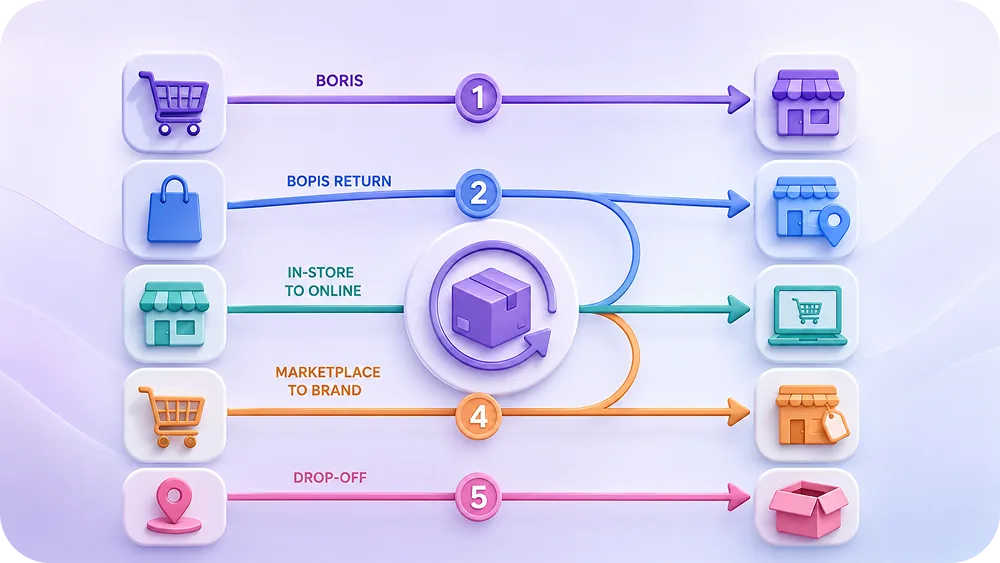
Omnichannel returns means accepting product returns through any channel the customer prefers, regardless of where the original purchase happened. The most common cross-channel return flows include:
- BORIS (Buy Online, Return In Store): The customer buys online but returns the product at a physical location.
- BOPIS returns: The customer bought via buy-online-pick-up-in-store and returns through the online portal.
- In-store purchase, online return: The customer bought in-store but files a return or claim through the brand's website or self-service portal.
- Marketplace purchase, brand-direct return: The customer bought through Amazon, Zalando, or another marketplace but returns directly to the brand.
The challenge is that each of these flows touches different systems: POS, ecommerce platform, warehouse management, and customer service tools. Without a unified approach, returns become a source of inventory errors, delayed refunds, and frustrated customers.
Why BORIS Matters More Than Ever
BORIS is not just a convenience feature. It is a strategic advantage for brands with physical retail presence.
Foot traffic conversion
When a customer walks into a store to return an online purchase, they are already there. Research from Harvard Business Review suggests that a significant percentage of in-store returners make a new purchase during the same visit. The return becomes a sales opportunity.
Faster return processing
Mail returns take days. In-store returns take minutes. For time-sensitive inventory (seasonal products, perishable goods, fashion items), getting products back into sellable stock faster directly impacts margin.
Lower logistics costs
Every mail-in return involves shipping, packaging, and processing at a distribution center. In-store returns skip most of that logistics chain. For brands with stores, BORIS can significantly reduce reverse logistics costs.
Customer satisfaction
Customers prefer immediate resolution. Walking into a store, handing back a product, and getting an instant refund or exchange is the fastest path to closing a return. That speed directly affects customer retention.
The Technical Infrastructure for Omnichannel Returns
Offering omnichannel returns sounds simple. Making it work behind the scenes is considerably harder. Here is what the infrastructure looks like:
Unified order visibility
Store associates need to see online orders. The online portal needs to see in-store purchases. This requires integration between the ecommerce platform (Shopify, WooCommerce, Magento) and the POS system. Without this, a store associate cannot process a return for an online order because they cannot verify the purchase.
Cross-channel return authorization
The return authorization process must work across channels. When a customer initiates a return online but wants to drop it off in-store, the return authorization (RMA) needs to be visible to store staff. When a store accepts a return for an online order, the ecommerce system needs to know.
Inventory reconciliation
This is where most omnichannel returns break down. A product returned in-store needs to be reflected in the central inventory system. If the product came from an online order fulfilled by a different warehouse, the inventory adjustment is not straightforward. The returned item sits in a store that may not normally stock it.
Brands need real-time inventory sync between POS, WMS (warehouse management system), and ecommerce. Without it, returned products become invisible to the system or show up in the wrong location.
Financial reconciliation
When a customer buys online and returns in-store, which entity absorbs the return? The online channel or the store? This matters for internal P&L reporting, commission calculations, and franchise relationships. The financial systems need to track the return against the original order and allocate costs correctly.
Claimlane connects to ERP and financial systems so returns and claims are automatically reconciled regardless of the channel.
Setting Up BORIS: Step by Step
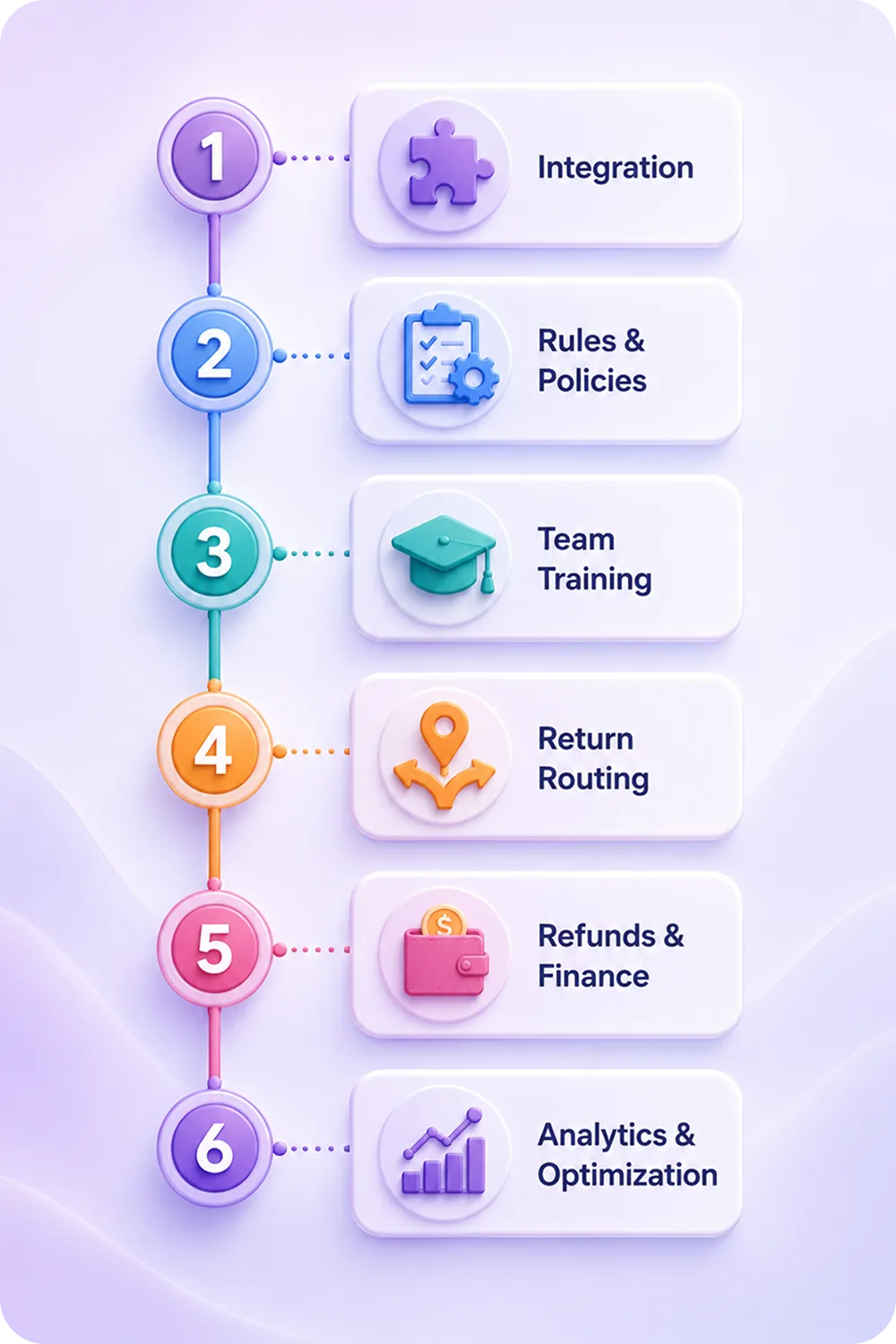
Step 1: Connect online orders to store systems
Integrate the ecommerce platform with the POS system. Store associates need to look up online orders by order number, customer email, or product barcode. This is the foundation.
Step 2: Define return eligibility rules per channel
Not every product can be returned in-store. Oversized items, hazardous materials, or items from specific fulfillment partners may need mail-in returns. Define which products qualify for BORIS and configure the rules in the workflow engine.
Step 3: Train store staff on cross-channel returns
Store associates need clear processes for accepting online returns: how to look up orders, how to inspect products, how to process refunds to the original payment method (which may be different from in-store payment options), and how to handle warranty claims that require photo documentation.
Step 4: Set up inventory routing
Decide what happens to returned products at the store level. Options include: restock at the store, ship back to the distribution center, ship to the original fulfillment location, or route to a secondary market. Build routing rules based on product type, store inventory levels, and product condition.
Step 5: Configure financial flows
Map out how BORIS returns affect revenue allocation between channels. Connect the returns system to the ERP for automatic credit processing. Ensure refunds are issued to the correct payment method regardless of where the return happens.
Step 6: Monitor and optimize
Track BORIS return volumes, conversion rates (new purchases during return visits), processing time at store level, and inventory routing efficiency. Use analytics to identify bottlenecks and optimization opportunities.
Managing Omnichannel Warranty Claims
Returns are one thing. Warranty claims across channels add another layer of complexity.
A customer who bought a product in a physical store may want to file a warranty claim through the website rather than driving back to the store. A wholesale partner may need to submit batch warranty claims for products their customers returned to them. These scenarios require a claims platform that is channel-agnostic.
Claimlane's AI Agent, the first AI agent purpose-built for warranty claims and returns, handles claims from any channel. Customers submit through the self-service portal with photos and product details. The AI analyzes the evidence, checks the warranty period, and recommends a resolution. Store staff can access the same system to process in-store warranty claims.
This matters because warranty data should flow into the same analytics system regardless of which channel the claim came through. A defect trend that shows up in both online and in-store claims is a stronger signal than either channel alone.
"Whether customers are shopping in-store or online, their expectations are, quite rightly, increasing every day. We, therefore, decided the time was right to invest in our vital online aftercare service, something which many retailers often overlook, despite its power to make or break a retailer's reputation if they do not get it spot-on."
Inventory Routing for In-Store Returns
When a customer returns an online order in-store, the store now has inventory it may not have ordered. Handling this correctly is critical.
Option 1: Restock at the store
If the store normally carries the product and current stock is low, the simplest path is to add the returned item to the store's inventory. This works well for popular items and reduces the need for restocking shipments from the warehouse.
Option 2: Ship to distribution center
If the store does not carry the product or already has sufficient stock, the return needs to be shipped back to the nearest warehouse. This adds a logistics step but keeps store inventory clean.
Option 3: Ship to original fulfillment center
For brands using multiple fulfillment locations or 3PL providers, returns may need to route back to the specific location that manages that product's stock. This is the most complex scenario and requires tight integration between the returns system and the WMS.
Option 4: Liquidation or secondary market
Some returned items cannot be resold as new. Depending on condition, they may go to a recommerce channel, liquidation partner, or recycling. The routing decision should happen at the point of return based on the product's condition grade.
Omnichannel Return Policies That Work
The return policy is the foundation of omnichannel returns. Here is what makes a policy work across channels:
Consistent time windows
Customers should have the same return window regardless of channel. A 30-day return policy that applies to online purchases but not in-store purchases creates confusion and frustration.
Clear channel options
State explicitly which return channels are available: mail-in, in-store, drop-off at partner location. Let customers choose based on their preference.
Channel-specific exceptions
Some products may not be eligible for certain return channels. Oversized furniture cannot be returned in-store. Hazardous materials require special shipping. Document these exceptions clearly.
Refund method transparency
Explain how refunds work across channels. A BORIS return may refund to the original online payment method (which can take 3-5 business days) rather than providing an instant cash refund. Setting this expectation upfront prevents store-level conflicts.
How Claimlane Supports Omnichannel Returns
Claimlane provides the claims and returns layer that sits on top of existing POS and ecommerce systems. Here is how it supports omnichannel operations:
Channel-agnostic claim submission
Customers submit claims through the self-service portal regardless of purchase channel. Store staff use the same system. The claim is linked to the original order through integrations with Shopify, WooCommerce, and other platforms.
Configurable workflows per channel
The workflow engine routes claims differently based on the return channel. In-store returns can follow a fast-track approval path. Mail-in returns can trigger inspection workflows. Warranty claims from any channel go through the AI assessment pipeline.
AI-powered claim review
Claimlane's AI Agent reviews claim evidence (photos, videos, product details) and recommends resolutions. This works whether the claim was submitted online, in-store, or through a partner portal.
Unified analytics across channels
All claims data, regardless of channel, feeds into the analytics dashboard. Return rates by channel, defect patterns, claim resolution times, and customer lifetime value impact are all visible in one place.
Claimlane is rated 4.8/5 on G2 and supports 75+ integrations across ecommerce, ERP, and customer service platforms.
"With Claimlane, we've transformed our returns process into a streamlined, automated system. We can now efficiently track the status of all returns and claims, and our teams collaborate more effectively than ever before."
Common Omnichannel Returns Mistakes
Not training store staff on online return processing
If store employees do not know how to look up online orders or process cross-channel refunds, the BORIS experience breaks down immediately. Invest in training and give staff easy access to the systems they need.
Ignoring inventory reconciliation
Accepting in-store returns without updating the central inventory system leads to phantom stock. Stores show inventory they do not actually have, or warehouses are unaware of returned items sitting in stores.
Treating every channel the same
Different channels have different constraints. A mail-in return requires prepaid labels and packaging. An in-store return needs staff training and POS integration. A drop-off return requires partner logistics. Each channel needs its own operational playbook.
Not communicating return options clearly
If customers do not know they can return in-store, they will not do it. Feature BORIS prominently on the website, in order confirmation emails, and on the returns portal. Make the option easy to find.
Slow refund processing for cross-channel returns
When a customer returns in-store but the refund goes to an online payment method, the delay can frustrate them. Be transparent about refund timelines and consider offering store credit as an instant alternative.
Measuring Omnichannel Returns Performance
Track these metrics to understand how well cross-channel returns are working:
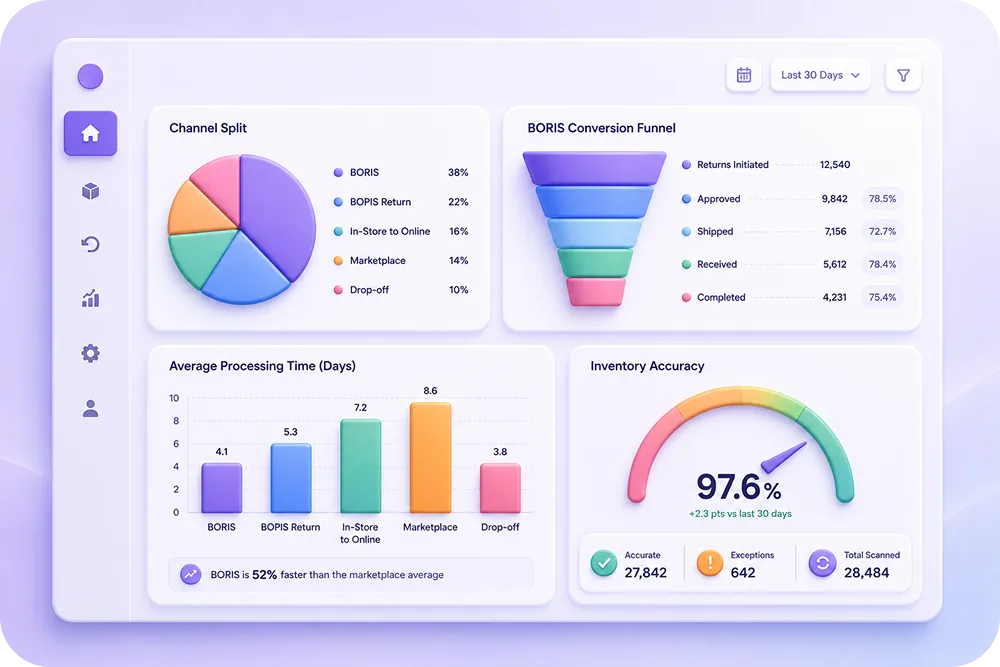
Return channel split
What percentage of returns come through each channel? If BORIS adoption is low despite having stores, there may be awareness or process issues.
BORIS conversion rate
What percentage of customers who return in-store make a new purchase? This is the key metric that justifies BORIS investment.
Cross-channel processing time
How long does it take to process a return that crosses channels versus a same-channel return? Identify where delays happen.
Inventory accuracy
Compare system inventory levels with actual physical counts. Discrepancies often trace back to cross-channel return processing errors.
Customer satisfaction by return channel
Survey customers after returns to understand satisfaction levels for each channel. Use this data to prioritize improvements.
FAQ
Conclusion
Omnichannel returns are no longer optional for brands selling across multiple channels. Customers expect to return products wherever it is most convenient, and BORIS has become the default expectation for brands with physical stores.
The infrastructure requires connected systems, clear routing rules, and a claims layer that works regardless of channel. Claimlane provides that layer with channel-agnostic workflows, AI-powered claim review, and the integrations needed to keep inventory, finances, and customer data in sync.
Book a demo to see how Claimlane supports omnichannel returns and warranty claims.



