.webp)
Every ecommerce return starts with the same question: how does the product get back? The answer, in most cases, is a prepaid return label. It's a small piece of logistics that has an outsized effect on customer satisfaction, return speed, and shipping costs.
For brands handling dozens or hundreds of ecommerce returns per week, how those labels get created, delivered, and tracked matters more than most teams realize. A manual process means wasted agent time. An automated one means faster turnarounds and lower costs per return.
This guide covers what a prepaid return label actually is, how it works across USPS, UPS, and FedEx, what it costs, and how to set up automatic label generation so the returns team isn't stuck creating them one by one.
TL;DR
- A prepaid return label is a shipping label where the retailer covers postage, letting customers print, stick, and ship without visiting a post office counter.
- Pay-on-use billing is the smart choice: brands only pay when labels are actually scanned, saving thousands compared to pre-printed in-box labels.
- On-demand labels via a self-service portal beat in-box labels for most brands, capturing return reason data before the label is issued and eliminating waste.
- Claimlane automates label generation as part of the returns workflow, connecting with major carriers through 75+ integrations so labels are created the moment a return is approved.
What Is a Prepaid Return Label?
The Basics
A prepaid return label is a shipping label where the retailer covers the postage cost instead of the customer. It includes a tracking number, a barcode the carrier scans at drop-off, and the destination address (typically a warehouse or fulfillment center).
The "prepaid" part means the brand has already arranged payment with the carrier. The customer just prints the label, sticks it on the box, and drops it off. No trips to the post office counter, no guessing at shipping rates.
How It Differs from a Standard Shipping Label
A standard outbound label ships from warehouse to customer. A return label flips that: the customer's address is the origin, and the brand's facility is the destination. Some carriers charge immediately when the label is generated. Others use a pay-on-use model where the brand only pays if the customer actually scans and ships the label.
That distinction matters. Brands that include printed return labels inside every outbound package ("in-box labels") pay for every label regardless of whether a return happens. Brands that generate labels on demand through a self-service portal only pay when someone actually initiates a return.
How Much Do Return Labels Cost?
Carrier Pricing Overview
Return label costs depend on carrier, weight, dimensions, origin zip, and destination. A few benchmarks:
- Lightweight apparel (under 1 lb): $4 to $7 via USPS, $7 to $10 via FedEx Ground, $8 to $12 via UPS Ground
- Mid-weight items (2 to 5 lbs): $7 to $14 across carriers
- Bulky or heavy items (10+ lbs): $15 to $30+ depending on distance and carrier
The National Retail Federation estimates that the total cost to process a return runs 21% to 33% of the original item price. The label itself is just one component, but it's one of the most controllable.
Pay-on-Use vs Charged-at-Creation
Two billing models exist:
- Pay-on-use: The label is generated but the brand only gets charged when the customer actually scans it at a carrier location. USPS and FedEx default to this model for electronic return labels. It's the smarter choice for most brands since it eliminates waste from unused labels.
- Charged at creation: The brand pays the moment the label is generated, whether or not it's ever used. Common with UPS and when labels are pre-printed and included in outbound shipments.
For brands processing high volumes, pay-on-use can save thousands per month. If the typical return rate is 15% to 30% of orders, paying for 100% of labels upfront means 70% to 85% of those labels go to waste.
Return Label Options by Carrier
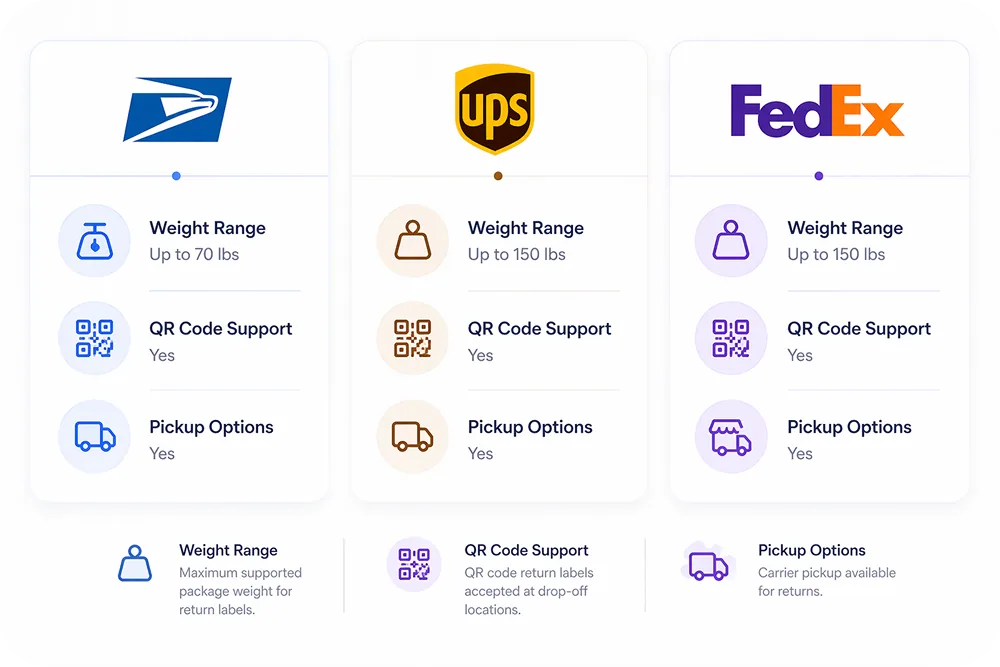
USPS Return Services
USPS offers several return label products:
- USPS Returns: Generate prepaid labels through Click-N-Ship or via API. Commercial pricing available. Tracking included.
- Priority Mail Return: For packages up to 70 lbs with 1-3 day delivery. Includes $100 insurance.
- Label Broker: Gives customers a QR code they can take to any post office to print the label there. Solves the "I don't have a printer" problem.
- Merchandise Return Service: Pre-authorized bulk labels. Pay-on-use, plus a per-piece fee.
USPS is the cheapest option for lightweight returns, which covers most apparel, accessories, and small consumer goods. For brands selling through Shopify, USPS integrations are straightforward.
UPS Return Services
UPS provides three main return label types:
- UPS Electronic Return Label: Emailed to the customer as a PDF. Simple and widely used.
- UPS Print Return Label: Pre-printed and included in the original shipment. Good for high-return categories like apparel.
- UPS Returns Plus: Three tiers (1 Attempt, 3 Attempts, Electronic) with varying levels of pickup service.
UPS is the default choice for heavier packages, B2B returns, and situations where scheduled pickup matters more than postage cost.
FedEx Return Services
- FedEx Electronic Return Label: Sent via email, charged only when scanned. The most common FedEx return option.
- FedEx Print Return Label: Pre-printed by the brand. Useful for in-box inclusion.
- FedEx Ground Returns: Cost-effective option for non-urgent returns with 1-5 business day transit.
FedEx is competitive for mid-weight packages and offers strong tracking visibility through FedEx Ship Manager.
| Feature | USPS | UPS | FedEx |
|---|---|---|---|
| Best for | Under 1 lb | 5+ lbs / B2B | 2-10 lbs |
| Pay-on-use | Yes | Electronic only | Yes |
| Printerless / QR | Label Broker | Access Point | FedEx Office |
| Pickup | Limited | Yes | Yes |
| Cost (1 lb domestic) | $4-$6 | $8-$12 | $7-$10 |
How to Create a Return Shipping Label
Manual Label Creation (Low Volume)
For brands processing fewer than 50 returns per month, manual creation works:
- Log into the carrier's shipping platform (USPS Click-N-Ship, UPS CampusShip, FedEx Ship Manager)
- Select "Return Shipment" or "Create Return Label"
- Enter the customer's address as origin and the warehouse as destination
- Choose a service level and enter package dimensions
- Pay or select pay-on-use billing
- Download the PDF label and email it to the customer
This takes 3 to 5 minutes per label. At 50 returns a month, that's over 4 hours of agent time just on label generation. That's time the returns team could spend on higher-value work like resolving warranty claims or analyzing return reasons.

Automated Label Generation (High Volume)
Brands processing 100+ returns per month need automation. Two paths:
API-based: Connect directly to carrier APIs (USPS Web Tools, UPS Developer Kit, FedEx Web Services). When a return is approved in the system, the API call generates the cheapest available label and emails it to the customer automatically. This requires developer resources to build and maintain.
Platform-based: Use a returns management system that handles carrier integrations out of the box. The customer submits a return request through a self-service portal, the system checks eligibility against the return policy, and if approved, generates the label automatically.
Claimlane connects with major carriers and shipping providers through 75+ integrations, making label generation part of the return workflow rather than a separate manual step. Rated 4.8/5 on G2 (read reviews), Claimlane handles everything from return initiation to label delivery.
Submits through self-service portal with reason code and photos
Return window, item condition, policy rules evaluated automatically
Cheapest carrier selected based on package weight, size, and distance
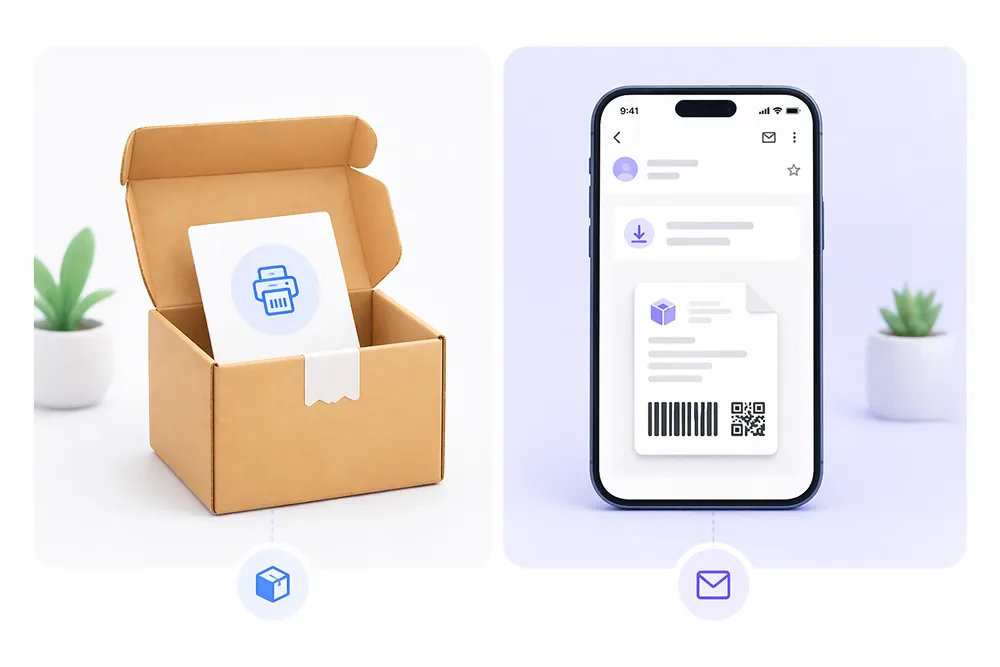
Email with printable PDF, QR code option, and drop-off locations
In-Box Labels vs On-Demand Labels
The Case for In-Box Labels
Some brands print return labels and include them inside every outbound shipment. The logic: it makes the return process as frictionless as possible. The customer doesn't need to log in, request anything, or wait for an email. They just peel, stick, and ship.
This works well for:
- High-return categories like apparel (where 20% to 40% of online orders get returned)
- Subscription boxes
- Brands competing on convenience (e.g., free returns as a selling point)
The downside is cost. If only 15% of customers return, 85% of those printed labels are wasted spend.
The Case for On-Demand Labels
On-demand labels are generated only when a customer actively requests a return. The customer visits the brand's return portal, selects the item, provides a reason, and receives a label via email.
Advantages:
- Zero waste on unused labels
- The brand captures return reason data before the label is issued
- Pay-on-use billing means even generated but unused labels don't cost anything
- The brand can apply return policy rules before generating the label (e.g., deny returns outside the window, offer store credit instead)
Most brands handling returns through a platform like Claimlane use the on-demand model. It gives the returns team visibility into every return before a label goes out.
The Printerless Return Problem
Why QR Codes Are Replacing PDFs
Not every customer has a printer at home. In fact, printer ownership has been declining for years as households go digital. That creates friction: a customer wants to return something but can't print the label.
Carriers have responded with QR code solutions:
- USPS Label Broker: Customer gets a QR code, takes it to any post office, and the label is printed for free.
- UPS Access Point: Customer brings the QR code to a UPS Store, Michaels, or CVS location.
- FedEx Office: Customer shows the QR code at a FedEx Office or Walgreens location.
For brands, offering a QR code alternative alongside a printable PDF label reduces "I can't print the label" support tickets significantly. Any modern returns management platform should support both formats.
Return Label Tracking and Visibility
Why Tracking Matters for the Returns Team
A return label without tracking is a blind spot. The customer ships the package, but the brand has no idea where it is or when it will arrive. That leads to:
- Support tickets asking "where is my refund?"
- Warehouse teams that can't plan staffing for incoming returns
- Delayed refunds because the team doesn't know the item is in transit
Every prepaid return label from USPS, UPS, and FedEx includes a tracking number. The question is whether that tracking data flows into the brand's returns system automatically or whether someone has to check carrier websites manually.
Platforms like Claimlane pull tracking data into the claims and returns workflow automatically, so the team can see which returns are in transit, which have been delivered to the warehouse, and which are ready for inspection and refund.
Brands that actively track return shipments can also reduce "where is my order" queries by proactively sending status updates as the return moves through the system.
Before Claimlane, our customer could expect their claim to involve back-and-forth emails and be quite time-consuming, now a claim will be submitted at 8:00 AM and resolved at 10:00 AM.
Rasmus Andersen, COO — Onyx Cookware
International Return Labels
Cross-Border Complexity
International returns add layers of complexity that domestic labels don't have:
- Customs documentation: A commercial invoice or customs declaration may be required.
- Duties and taxes: Who pays duties on the return shipment? In some cases, the brand gets charged import duties on its own returned product.
- Carrier availability: Not all USPS/UPS/FedEx return services work in every country.
- Cost: International return shipping can cost $15 to $50+ depending on the origin country.
Many brands that sell internationally opt for returnless refunds on low-value items rather than paying for international return shipping. For higher-value items, partnering with a regional 3PL that has a local return address can cut costs significantly.
Return Label Best Practices
Cost Optimization Strategies
- Use pay-on-use labels. Never pay for labels that don't get used.
- Rate-shop across carriers. Don't default to one carrier for all returns. The cheapest option depends on weight and distance.
- Set minimum thresholds for free return labels. Not every return needs a prepaid label at the brand's expense. Consider charging for buyer's remorse returns while covering defective product returns.
- Negotiate commercial rates. High-volume shippers (500+ labels/month) can negotiate 15% to 30% discounts with carriers.
- Consider restocking fees to offset label costs. Some brands charge a small restocking fee that covers the return shipping cost.
Reducing Return Volume (So Fewer Labels Are Needed)
The best return label strategy is needing fewer of them. Brands can reduce returns by:
- Improving product descriptions and photos
- Adding size guides and fit tools for apparel
- Using analytics to spot products with high return rates and fix the root cause
- Catching defect patterns early with data from warranty claims
Claimlane's analytics dashboard shows which products get returned most, why, and which suppliers are responsible for quality issues. That data helps brands fix the problem at the source instead of just processing more returns.
How Returns Platforms Handle Labels Automatically
What Automation Looks Like
In a fully automated setup, the return label process looks like this:
- Customer visits the brand's self-service return portal
- Selects the order and item(s) to return
- Chooses a return reason from a dropdown (this feeds into returns analytics)
- Uploads photos if required (especially for damaged items or warranty claims)
- System checks the return policy automatically
- If approved, the system generates the cheapest available label and emails it with a QR code option
- Customer ships the package; tracking updates flow into the system in real time
- When the package arrives at the warehouse, the refund or replacement is triggered automatically
The entire process happens without a support agent touching it. For brands like Davidsen, that kind of automation is what reduced their claims team from 5 agents to 1-2.
Amazon's 2026 Return Label Changes
What Sellers Need to Know
As of February 2026, Amazon requires all US sellers to use the Amazon Prepaid Return Label (APRL) program for customer returns, regardless of item value. The previous exemption for high-value items has been eliminated.
This means:
- Sellers can no longer provide their own return labels for Amazon orders
- Amazon generates all return labels through Buy Shipping
- Seller-fault returns (wrong item, damaged, not as described) are charged to the seller
- Buyer-fault returns (changed mind) have shipping costs deducted from the buyer's refund
For brands selling on Amazon alongside their own DTC store, this creates a split process: Amazon handles labels for marketplace orders, while the brand needs its own return label system for D2C orders. Having a dedicated returns platform for the DTC side keeps things organized.