For retailers and ecommerce brands, warranty claims are one of the most expensive and time-consuming post-sale workflows. Email threads with customers chasing images and receipts. Spreadsheets that never match the ERP. Manual supplier reimbursements that fall through the cracks. The problem isn't the claims themselves, it's the manual infrastructure most brands run them on.
If you’re handling warranty returns this might sound familiar?
- You rely on email to manage warranty claims and customer complaints.
- Gathering images, videos, and receipts takes multiple emails.
- Warranty data is scattered across Excel, Google Drive, and different systems.
- You manually coordinate with suppliers for reimbursements.
- Every refund, replacement, or discount requires manual effort.
- You create return shipping labels one by one.
- Customers sometimes fall through the cracks, leading to a bad experience.
If any of this resonates, you’re not alone. Managing warranty claims manually is slow, frustrating, and prone to errors.
That’s why warranty management software exists - to bring automation, structure, and efficiency to a chaotic and VERY manual process.
If any of the symptoms above feel familiar, you're the target reader for this guide. Warranty management software automates the claim lifecycle end to end, from customer submission to supplier credit note, and gives retail and ecommerce brands a single platform to run what used to take three teams and five tools.
What is Warranty Claim Management?
Warranty management is the process of handling warranty claims, repairs, and replacements across a product's warranty period. It covers customer-facing claim submission, internal validation, supplier reimbursement, and the final resolution, refund, repair, or replacement, all while keeping compliant with stated warranty terms.
Why is a Warranty Management Software crucial for your business?
Almost all retailers, suppliers and e-commerce stores manually deal with warranty claims and returns. The average retail return rate is about 26% for ecommerce. Handling warranty claims and returns is time consuming for every party involved. Emails back and forth between support and customer, warehouse logistics and supplier communication. It is all very messy.
What industries have a problem with warranty claims?
While Fashion and the clothing industry is known for dealing with massive amounts of returns, the problem is usually fixed by have a return label shipped together with the product. Almost all other industries have a problem with warranty claims and returns.

A Warranty Management software helps reduce the amount of manual work
A Warranty Management Software like Claimlane, takes care of both returns and warranty claims (depending if you need to solve both issues), automating key tasks:
- Self-service return portal: eliminates the need for emails with customers
- A dedicated platform to store and get an easy overview on all warranty returns.
- Data and analytics into your returns and warranty claims.
- Prevents fraudulent claims by automating validation processes.
- Improves customer satisfaction by ensuring fast refunds, repairs, or replacements.
- Reduces operational headaches by automating warranty tracking instead of relying on emails and spreadsheets.
How Warranty Claim Processing Works
Your warranty claim process is how you collect, validate, and resolve every incoming claim. Every step, from customer submission to return label creation to supplier reimbursement, is a candidate for automation.

Typical Warranty Claim Process (When Managed Manually)
- Customer reports an issue (via email, phone, or a web form).
- Customer support requests proof (receipts, images, videos).
- Customer sends proof in multiple emails (leading to confusion).
- Warranty claim details are recorded manually (often in a spreadsheet).
- Business contacts the manufacturer or supplier (if reimbursement is needed).
- Customer waits for a decision (often for days or weeks).
- Once approved, refund, replacement, or repair is processed manually.
- A return label is created manually if necessary.

Warranty Claim Process (With a Warranty Management Software)
Different Approaches to Warranty Claim Management
There are different ways to handle and manage your warranty claims. Whether you do it manually, through a Help Desk, directly in your ERP or use a Warranty Management Software, there will be pro's and con's.
Manual Warranty Claim Processing
- Pros: End-to-end automation, direct integration with ERP and ecommerce, real-time tracking, customer-friendly self-service portal, analytics dashboards, and supplier workflow automation.
- Cons: Time-consuming, prone to errors, lacks tracking, difficult to scale.
SAP Warranty Claim Management
We don’t recommend handling your Warranty Claims directly in your ERP such as SAP or Business Central. Often that results in your business becoming too reliant on a few super users and your support team that actually deals with these issues will be left in the dark.
- Pros: Enterprise-level solution, connected to your finances
- Cons: Expensive, complex setup, requires specialized training.
- We recommend connecting SAP to a Warranty Management System such as Claimlane.
Manage claims through a Help Desk (Zendesk, Intercom etc)
Managing warranty claims through a Help Desk systems can provide a structured and customer-centric approach, though there is a lot of limitations when handling claims.
Pros:
- Centralized Communication: All customer interactions, including warranty claims, are handled in one place.
- Integrations Available: Can be integrated with CRMs, ERP systems, or dedicated warranty management solutions.
Cons:
- Limited Warranty-Specific Features: Help desks aren’t designed specifically for warranty claim processing, leading to potential feature gaps.
- Manual Processes Still Involved: Without integrations or automations, managing claims will still be time-consuming and error-prone.
- Scaling Challenges: As claim volumes increase, help desks might struggle without additional tools or workflows.
- Potential for Miscommunication: If not properly segmented, warranty claims might get lost among regular customer support tickets.
Dedicated Warranty Management Software (e.g., Claimlane)
- Pros: End-to-end automation, seamless integration, real-time tracking, easy for customers, data analytic, self-service portal, and much more.
- Cons: Requires some initial setup.

How Onyx Cookware automated warranty claims and hit 9x ROI
Key Features of Warranty Management Software
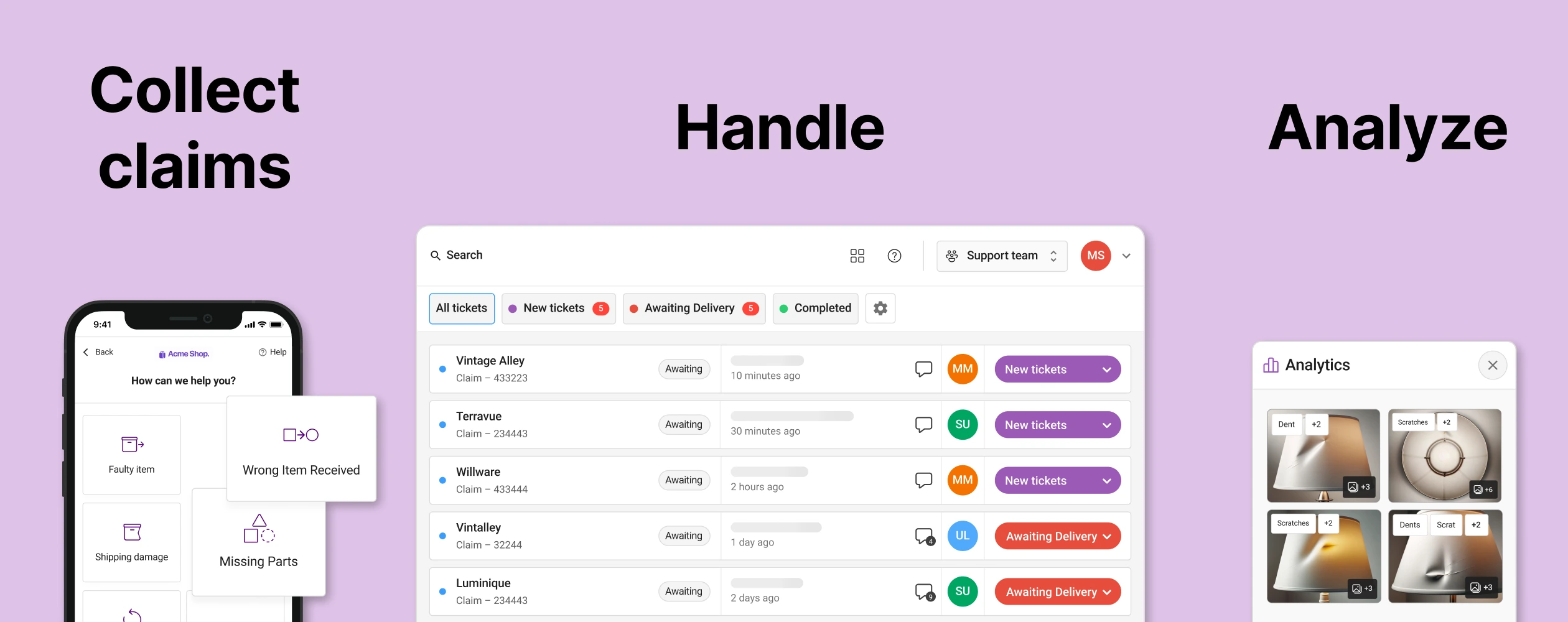
The best warranty management solutions include:
- Automated warranty claim processing – No more manual emails.
- Centralized data storage – Track all claims, receipts, and images in one place.
- Integration with suppliers & manufacturers – Easily forward claims for reimbursements.
- Warranty Registration Tool - Let your customers register their warranties
- Return shipping label generation – No need to create labels manually.
- Automated refunds & replacements – Process resolutions in a single click.
- Warranty claim analytics – Identify trends, reduce claims, and improve product quality.
- Self-service return portal – Let customers submit claims and track status without contacting support.
Warranty Registration Tool
Encouraging customers to register their products helps track warranties and collect valuable first-party data. This simple step enhances warranty management and offers several benefits:
- Efficient Warranty Tracking: Easily verify warranty status, reducing processing time and improving customer satisfaction. If you want to learn more about the best Warranty Tracking Software out there, check out our article.
- Better Customer Engagement: Keep customers informed with updates on product maintenance, recalls, or new releases.
- Valuable Data Insights: Collecting registration data helps refine marketing strategies and product offerings.
- Enhanced Brand Loyalty: A smooth registration process fosters trust and strengthens customer relationships.
By making warranty registration easy, you improve both the claims process and overall customer experience. Discover how Claimlane simplifies warranty registration for you.
Want to offer extended warranties, but not sure if it's worth it?
How return data reduces warranty claims, with examples
Analytics into your warranty claims is important part of a warranty claim software. By analysing product return reasons you can lower your product return rate and reduce the amount of future warranty claims.
- Identify common defects and improve product quality.
- Open a report and see your most claimed products.
- See return reasons and images on your most claimed products.
- Uncover product faults and fix production issues.
- Analyze your vendors’ products.
- Set clear warranty rules to reduce unnecessary claims.
- Automate detection of potential fraudulent returns
- Reduce return fraud.
- Increase profits
- Spend more time on actual customers
- Provide proactive support to prevent unnecessary returns.

Example 1: How proactive support can reduce Warranty Claims
In your return portal create an option for missing parts. Let your customer choose which missing part and send it right away. Then you:
- Reduce unnecessary returns. They’ll get to keep the product and fix their issue.
- Increase customer satisfaction and loyalty
Example 2: Using return and warranty claim data to reduce product return rate
The data shows that most warranty returns come from customers expecting a different size than what arrived.
Through the data it is clear to you that almost all warranty returns are due to your customers thinking it is a different size.
You update the product page with clear dimensions and a sizing guide.
- Reduce future returns and warranty claims.
- Lower customer frustration
- Reduce costs
These are two examples of using return data to reduce future claims. For a deeper walkthrough of return analytics techniques, read our guide to warranty analytics.
How a Warranty Return Software can simplify furniture returns
The furniture industry is a great example of an industry, where warranty claims can slow down your growth. Due to the complex nature, it is important to try and simplify your warranty process.
How Warranty Management Software Improves the Post-Purchase Experience
The post-purchase experience is a critical moment for customer retention. A smooth warranty claim process can turn a frustrated customer into a loyal one.
- Faster claim approvals = Happier customers.
- Clear communication = No confusion or frustration.
- Automated resolutions = No waiting for manual approvals.
When customers trust your warranty process, they are more likely to buy from you again.
Self-Service is key for your customer service
More and more customers expect to be able to handle their issues themselves and on their own time. According to Forbes, 67% of customers prefer self-service over speaking with a support agent. Customers want to fix their problems themselves and on their own time.
4 ways to incorporate self-service into your post-purchase experience
- AI-Chat bot: Companies are inserting chat bots into their sites, trained on native material, so they are able to fix customer issues. Though there is a chance this creates an even more frustrating experience, it is important to always have the “Speak to a human”-option.
- Self-Service Return Portal: Instead of writing an email or phoning the company, let the company self-serve their way through the returns or warranty claim process.
- Well made FAQ: Provide your customers with a FAQ that actually answers their questions
- Order tracking: Allow your customers to track their orders.
How to improve logistics with a Warranty Management Software
Your customer service team (and your customers for that matter) are not the only ones happy that you implemented a Warranty Management Software. Your logistics team, warehouse operators, and operations team will also be impacted by the software.
How does your logistics look without a Warranty Management Software?
Just like your customer service team, your warehouse and logistics team’s work is filled with manual work.
Ecommerce warehouse to-do list for handling warranty returns
- Receive the claimed product.
- Inspect for fault.
- Determine appropriate output. Re-stock, trash, repair.
- Fill out all data manually into either a spreadsheet or ERP.
- Coordinate all this with the customer service team.
As you can see it is a tiring process. Luckily almost all steps can be automated by warranty management tool like Claimlane:
- The warehouse receives the warranty claim information on the Claimlane dashboard
- They receive the package. Now they know what fault to look for.
- The output has already been chosen in the self-service portal.
- The warehouse team just needs to finalize the output, such as re-stock it.
- All data is already updated in Claimlane, coming directly from the customer.
How to Choose the Best Warranty Management Solution
When selecting warranty management software, consider:
- Automation – Does it eliminate your manual work? Check whether it handles email chains, spreadsheet data entry, and supplier coordination automatically.
- Integration – Can it connect with your e-commerce, ERP, Help desk, Shipping provider and CRM system? Browse Claimlane's full integration list.
- Scalability – Will it handle high claim volumes as you grow?
- Analytics – Does it help reduce warranty claims with insights? Data is key here, without it you’re moving in the dark.
- Return handling: Can the platform also handle returns. It might be nice for your business to consolidate into one platform.
A strong warranty system connects customers, internal teams, suppliers, and logistics into a single workflow, so claims don't get stuck between tools.
How Sebra turned warranty claims into a value-creating activity

Warranty management software FAQ
Looking for a Warranty Management Software?
Handling warranty claims manually is slow, inefficient, and frustrating for both businesses and customers. A warranty management platform solves these problems by automating claims, reducing errors, and improving communication.
If you’re still managing warranties via email and spreadsheets, it’s time for an upgrade. Investing in warranty claim software will save time, reduce costs, and create a better experience for customers. Reach out to us to see how we can help with your warranty claims handling.
.webp)