
.webp)
Most ecommerce brands handling physical products have the same problem with returns. The team is doing too much by hand. Switching tabs, copying data, looking up information in one system to paste into another. The work is repetitive, error-prone, and the team's best people end up spending their day on admin instead of customer-facing work.
The fix isn't more headcount. It's better infrastructure. Specifically, it's connecting the systems your team already uses so the data flows automatically between them.
This article is about how returns management process automation actually works. Not in theory. In the specific practice of integrating ecommerce, logistics, helpdesk, and ERP systems so the team stops doing manual handoffs.
The 30-second diagnostic: how manual is your current process?
Walk over to the team that handles returns. Look over their shoulder for ten minutes. The signs of manual work are obvious once you know what to look for.
If your team is doing any of these, you have an automation opportunity worth acting on:
- Opening three tabs to process one return
- Copying order numbers between two systems
- Typing the same customer details into multiple places per case
- Manually generating return labels one by one
- Forwarding emails between support and warehouse to coordinate
- Re-entering refund details into the finance system at month-end
- Updating spreadsheets to track returns the helpdesk doesn't show
Choosing the right tool is the first step toward automating returns. Here's our comparison of the best returns software for ecommerce in 2026.
What a returns management process actually looks like
A returns management process spans more systems than most teams realise. From the moment a customer initiates a return to the moment the refund hits their card, the data has to flow through multiple platforms.
The customer logs into a returns portal, enters their order details, selects the product and reason. The portal pulls order data from the ecommerce platform automatically.
The returns platform talks to the shipping provider, generates a return label, and sends it to the customer with tracking. The team doesn't touch this.
The package arrives, warehouse staff scan the return label, inspect the product, and grade its condition in the warehouse system. Status updates back to the returns platform automatically.
If the return passes inspection, the refund is triggered through the ERP. Credit notes generate automatically. Finance doesn't need to lift a finger.
The customer gets automatic notifications at every stage. Status updates flow into the helpdesk so support has full context if the customer asks.
This whole flow can run end-to-end without anyone in the team typing a single thing into a second system. But only if the systems are integrated.
The four integration types that drive returns automation
Returns management process automation depends on four key system integrations. Most ecommerce brands have all four of these systems already. They're just not connected to each other.
Shopify, Magento, WooCommerce, PrestaShop, Umbraco.
What it unlocks: Pulls customer and order data into the returns flow automatically. The customer doesn't have to type their order number. The team doesn't have to look it up.
Webshipper, Shipmondo, nShift, Consignor.
What it unlocks: Generates return labels with the right carrier automatically. Tracks shipments back to the warehouse. The team stops creating labels one at a time.
Zendesk, Salesforce, Gorgias, Intercom.
What it unlocks: Gives the support team full visibility into return status without switching tools. Customer asks "where's my refund?" and the agent has the answer in one tab.
Business Central, NetSuite, SAP, and other major ERPs.
What it unlocks: Triggers credit notes, refunds, spare part orders, and inventory updates automatically. Finance stops re-entering data at month-end.
The compounding effect matters. Each integration alone saves time. Together, they remove the need for the team to do any data entry at all.
Returns management best practices for automation
The brands that get returns automation right don't just install integrations and walk away. They follow a few practices that make the integrations actually deliver.
Document every step of the current process: who touches the return, what system they're in, what data they move. Most automation gaps become obvious when the workflow is on paper. Some teams find they don't need every integration once they see the actual flow.
The ecommerce-to-returns integration delivers the highest immediate value because it eliminates the most common manual task: looking up the customer's order. Start here, prove the value, then layer in the rest.
Integrations move data, but rules decide what happens. Define which returns get auto-approved (low value, in policy, clear evidence), which trigger replacements, and which need manual review. Without rules, you've automated data movement but not actual work.
Measure agent time before integrating, then again after. Most teams discover ecommerce integration alone saves 5-10 minutes per return. At 200 returns a month, that's 16-33 hours of agent capacity recovered without touching anything else.
Systems change. APIs deprecate. New stores or warehouses get added. Quarterly audits catch broken connections before they become silent data loss. The cost of a missed sync is much higher than the cost of the audit.
These five practices apply whether the brand is on Claimlane or any other returns platform. The integrations matter. So does the discipline around them.
Returns management strategies that actually scale
Beyond the technical integrations, three returns management strategies separate the brands that scale gracefully from the ones that hire endlessly.
30-60% of returns are clear-cut: in-policy, valid order, standard reason. Auto-approve them. Save the team's time for the 40-70% that need actual judgement.
Every integrated return becomes data on product quality, supplier performance, and customer behaviour. Brands that act on the data fix the products driving the most returns. Brands that don't, keep getting the same returns.
Returns fulfilment isn't a sub-function of outbound fulfilment. It needs its own workflow, KPIs, and integrations. The brands treating it that way get faster resolutions and cleaner data.
You can integrate Claimlane in just a few clicks:
One of the most effective automation strategies is skipping the return entirely. Learn when and how to use returnless refunds to save on shipping and processing costs.
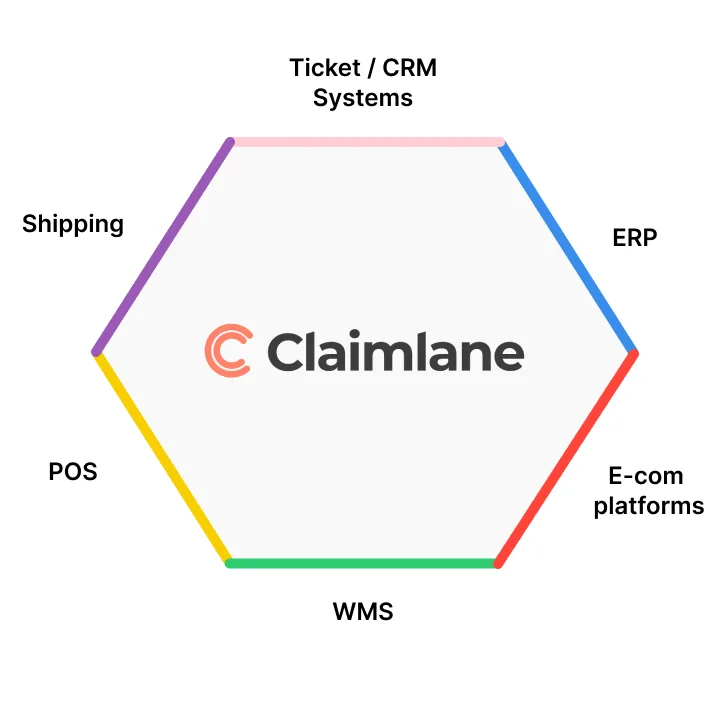
So, how do you get these integrations? Good news is that they come out of the box. So for customers with standard needs you can get the integrations in just a few clicks. This means you don’t even need to spend time or money building them. Just click and let the data flow!
If you don’t see your integration in the list above or if you have specific needs, we do offer to build custom integrations as part of our Advanced plan.
✅ The bottom line
Integrations aren't a "nice to have". They're what turn a manual returns process into an automated one. The less your team has to copy, paste, and search between systems, the faster every case closes, and the more time they get back for the work that actually moves the needle.
Why this matters: the cost of doing nothing
For most ecommerce brands, the cost of unintegrated returns isn't visible until you measure it.
Saved per return after ecommerce integration
Reduction in admin time per return at full integration
Typical resolution time on email-based returns
Typical resolution time with full integration
Automation also helps you catch abuse early. Here's what ecommerce brands need to know about return fraud and how to prevent it at scale.
Davidsen made exactly this transition. From a team of 5 agents handling claims through scattered systems to 1 to 2 agents using Claimlane with full ecommerce, logistics, and ERP integration. Same volume, fraction of the work.
The bottom line
Integrations aren't an upgrade. They're the difference between a returns process that scales and one that breaks the team as volume grows.
The less the team has to copy, paste, and search between systems, the faster every case closes. The more time they get back for the work that actually moves the business forward.
If the team is currently switching between three or more tabs to handle a single return, the path to automation is already sitting in the integrations menu. The question is just whether to start now or after the next 6-month period of paying the manual tax.
Want to see which integrations could save your team the most time?
Book a demo →


