
Every Magento to Shopify migration checklist covers the same ground. Products, customers, order history, themes, apps, 301 redirects, SEO benchmarks. Search for one and you will find twenty versions of the same list, written by agencies and migration tools.
None of them mention warranty claims.
That gap is not academic. Returns, warranty claims, repairs and spare part requests are running right now, on the platform being replaced. On cutover day they still have to run. When nobody owns that workstream, the process falls back to what it was before anyone built anything: a shared inbox and a spreadsheet.
Replatforming is when the claims process finally gets looked at
There is a pattern in how this goes. The ecommerce decision gets made. The ERP decision gets made. Then somebody in customer service asks what happens to warranty claims, and the room goes quiet.
That silence has a simple cause. In most brands, warranty claims never had a system to begin with. The process is an inbox, a spreadsheet, and one person who knows how each supplier wants their claims submitted. A migration cannot break that process. Nothing can break it. It will survive the move fully intact, on a brand new platform, and the whole point of replatforming was to stop working like that.
What actually breaks when you leave Magento
Six things go wrong. Most of them do not show up until the storefront is already live and the project team has moved on.
1. The Magento returns extension does not come with you

Magento extensions have no automatic Shopify equivalent. During discovery, every extension in the stack gets audited and sorted into one of three buckets: replaced with a Shopify app, rebuilt in the theme, or retired.
Returns and RMA extensions are usually retired. They are not tied to revenue, so nobody defends them in the meeting. The claims process is then homeless, and nobody notices for weeks.
The same is true for anything hand coded. Plenty of brands run claims through custom code sitting inside an old CRM or an ageing ERP module. That code was built for the platform being switched off, and rebuilding it on the new one is exactly the kind of custom project the migration was supposed to end.
2. Order history arrives read-only, but warranty periods keep running
Migration tools move historical orders across. In Shopify they land as read-only records.
A warranty claim on an order placed before cutover still needs that order. The SKU, the purchase date, the customer, the channel. Warranty periods run for two years, three years, sometimes ten. The migration does not reset any of them.
Some categories carry ten year warranties on certain parts. The history behind those claims often sits across several legacy systems, and the data from back then was never clean in the first place. Migration does not fix that. It adds a boundary line through the middle of it.
If the new claims process depends on pulling live order data from Shopify, it will not work for anything bought before the switch. Which is most of the warranty claims that will arrive in the first two years.
3. Bundles and configurable products get restructured
Magento's grouped, bundled and configurable products do not import as they are. They get rebuilt on the other side, and the structure changes.
Anything that depended on knowing exactly which part of a product failed is now pointing at a product tree that moved underneath it. Spare part requests. Part-level warranty rules. Supplier routing by SKU. All of it needs remapping.
This lands hardest on furniture, outdoor gear, electronics and DIY, because those are the catalogues where one product is really twenty components. A sofa claim is rarely a sofa claim. It is a claim about one cushion, one leg, one mechanism, sourced from one specific supplier.
4. Customer accounts lose their passwords
Shopify does not support password migration. Every customer resets after launch.
When the returns portal sits behind a customer login, a share of claim submissions fail in the first weeks. Those failures do not disappear. They arrive in the support inbox as emails, which is exactly where the process was supposed to stop being.
5. The aftersales URLs change and nobody redirects them
/returns, /warranty, /rma, /claims. Those pages are bookmarked, printed on packaging and inserts, and linked from order confirmation emails going back years.
Redirects get built carefully for products and collections, because that is where the SEO traffic is. They rarely get built for aftersales pages. Customers who hit a 404 phone support instead, and the cost of the missing redirect shows up as call volume rather than lost rankings.
6. The returns app you install on Shopify is not a warranty system
This is the most expensive misunderstanding of the whole project.
Shopify's app store is full of returns apps. They are built for a specific job: a customer changes their mind, ships an item back within thirty days, gets a refund or an exchange. For fashion and simple goods, that job is enough.
A warranty claim is a different job. It arrives eighteen months after purchase. The product is not unwanted, it is broken. The customer needs to prove the fault with photos, a video, a serial number, a receipt. The right outcome is often not a refund. It is a repair, a replacement part, a technician visit, or a rejection. And when the product was faulty from the factory, the cost belongs to the supplier, which means the claim has to be forwarded to them with the exact documentation their guidelines demand.
Installing a returns app and calling the aftersales workstream done is how a brand ends up with a fast refund flow and a warranty process still running on email eight months after go-live.

The open cases nobody plans for
On cutover day there are live cases. Claims waiting on supplier approval. Repairs sitting at a service centre. Returns in transit. Spare parts on backorder from a factory in another country.
Every one of them exists in the old system, and the old system is being switched off.
Three questions need an answer before the migration date, not after it:
- Where do open cases live during the switch, and who is watching them. Open cases almost always need to be re-submitted in the new system rather than migrated, because the case data, the customer communication and the supplier thread rarely map cleanly across.
- What happens to closed case history. Finance and quality teams need it. It usually comes across as a bulk file, useful for reporting rather than as live cases to work on.
- Who tells the customer. A customer with an open claim during a platform switch is the single easiest customer to lose.
Skipping this is how a brand ends up running two processes in parallel for months, with a customer service team checking two places for every case. That state is what most teams describe when they finally go looking for something better, and it is entirely avoidable with one meeting held early enough.
A realistic timeline
Aftersales does not need to be the first workstream in the plan. It does need to be in the plan.
Where warranty claims fit in a migration projectPhaseWhat happens to warranty claimsDiscovery and auditInventory the current process. Count volume, handling time and cost per case. Flag the returns extension and any hand coded claims logic as items that will not survive.ScopingDecide what replaces them. Scope the integrations: Shopify, ERP, helpdesk, shipping, 3PL. Decide how pre-migration orders are handled.Build and stagingConfigure the portal, the workflows and the supplier rules in parallel with the storefront build. Test claims against migrated read-only orders, not just new ones.Two weeks before cutoverStop taking new cases into the old system. Assign an owner to every open case. Brief customer service on where cases live during the switch.Go liveAftersales goes live with the storefront. Redirects for /returns and /warranty go live at the same time.Post launchWatch the support inbox. Every claim arriving by email is a gap in the setup, and the first four weeks will tell you exactly where they are.
How to build the business case
The reason aftersales falls off migration plans is not that people disagree it matters. It is that nobody has ever put a number on it, so it cannot compete with workstreams that have one.
Three numbers are usually enough.
- Cases per month. Count every entry point, not just the ones in a system. The email inbox is where the volume hides.
- Minutes per case. Time it with a stopwatch for a week. Teams consistently guess low, because the guess covers the happy path and not the four emails chasing a serial number.
- Fully loaded hourly cost of the people doing it. Including the warehouse time and the finance time, not just customer service.
The numbers that come out of that exercise tend to be uncomfortable. A claims process that feels like a minor annoyance usually turns out to cost the equivalent of a part-time hire, sometimes a full-time one. That is the moment it stops losing to everything else on the roadmap.
Once those numbers exist, the aftersales workstream stops being the thing that gets cut and starts being the thing with the clearest payback in the project. The pricing page includes a calculator that turns those three inputs into an annual figure.
Why the migration window is the moment, and why it closes
During the migration there is budget, a project plan, and a group of people already making decisions about the tech stack. Returns and warranty claims are the cheapest thing on that list to get right, because the integration work is happening anyway.
Six months later, none of that is true. Claims are back in the inbox, everybody is busy, and the case has to be built from scratch against a process that technically works. Technically working is the enemy here. Nothing gets fixed because nothing is on fire, and the cost just sits there, invisible, in ten-minute increments.
There is a second reason, and brands who have just moved say it out loud. Shopify makes integration realistic in a way Magento often did not. Connecting the helpdesk, the ERP, the carriers and the warehouse is finally a normal piece of work rather than a project. That window is open during the migration, and it narrows the moment the team moves on to the next thing.
The claims process does not have to wait for the migration
Claimlane connects to Magento and to Shopify. That matters more than it sounds.
It means the warranty and returns process can be fixed before the storefront moves, and it stays in place through the cutover. The migration then removes one system instead of creating a new gap. For brands where the claims process is already the loudest complaint in customer service, this is the faster path: fix the process now, migrate the storefront on its own timeline, and stop treating them as one project that can only happen in one order.
It also removes the argument that comes up in every migration meeting, which is that aftersales has to wait until the platform work is finished. It does not. It is one of the few pieces of the stack that can move first.
What a connected claims process looks like

Once the process is out of the inbox, the shape of it is straightforward.
- One self-service portal where customers submit returns, warranty claims, repair requests and spare part requests. Photos, videos, serial numbers and order details are collected upfront, so the team stops chasing.
- Rules and workflows that route each case to the right team based on SKU, supplier or case type, and trigger the right outcome automatically.
- Integrations that handle refunds, replacements, gift cards, shipping labels and ERP credit notes from inside the case, instead of across four browser tabs.
- Supplier claims forwarded with the exact documentation each supplier asks for, so credit notes actually arrive rather than getting forgotten.
- Analytics on what gets claimed, how often, and which products keep coming back, which is the data most brands lose entirely during a migration.
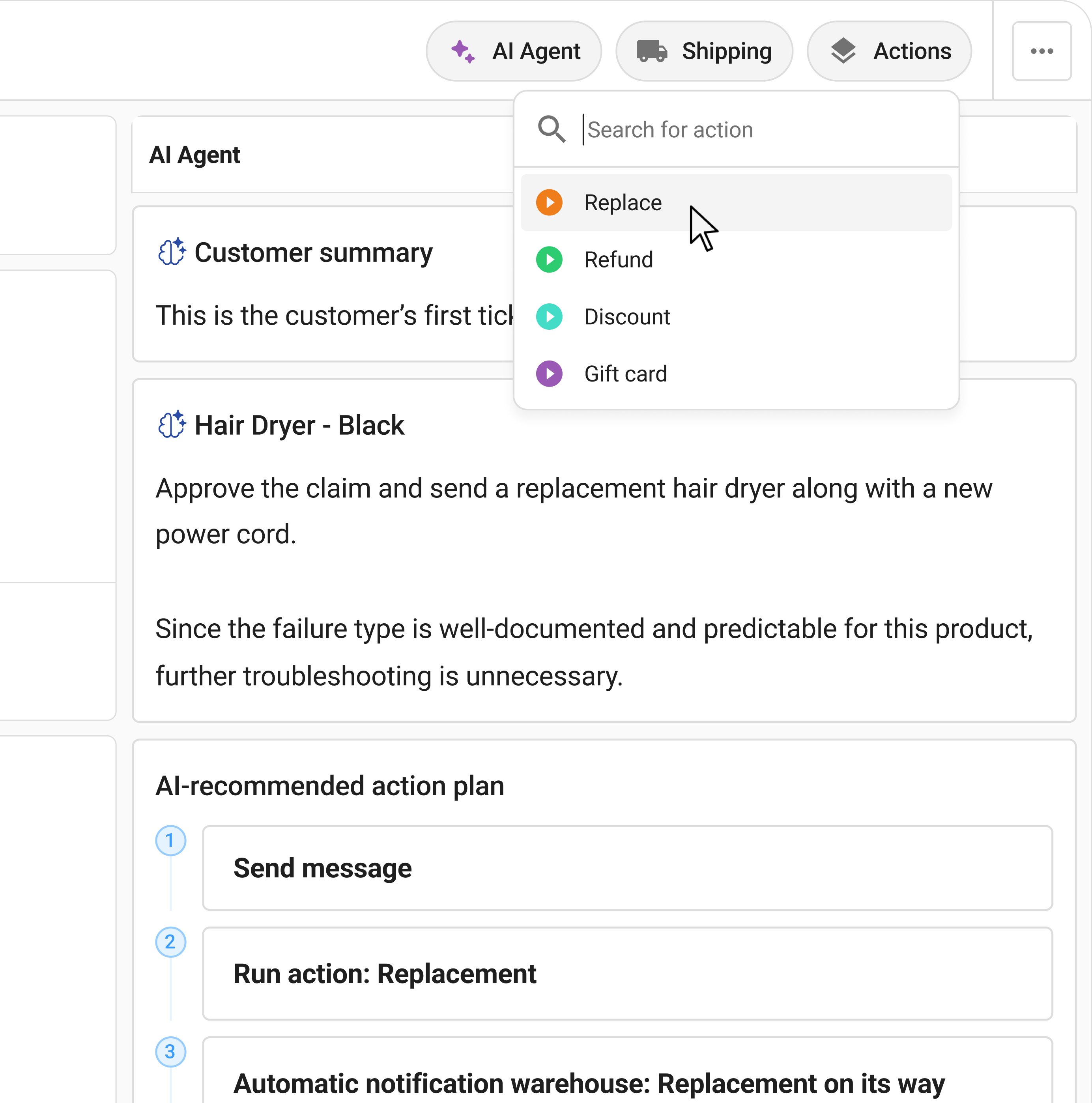
- Claimlane's AI Agent, the first AI agent purpose-built for warranty claims and returns. It reviews the images and video the customer submitted, applies the warranty rules for that product and that supplier, and recommends the resolution.
MaxGaming, the largest gaming and e-sports ecommerce business in Scandinavia, runs more than 30,000 SKUs across 200+ brands. Their complex RMA cases are now resolved 77% faster using Claimlane's AI Agent, because the agent reviews the images and checks the business rules instead of a support agent needing months of product training first.
Black Diamond cut their warranty case SLA from 25 days to 5. Davidsen went from five agents handling claims to one or two.
Before the migration plan is signed off
Ask one question in the next migration meeting. What happens to a warranty claim on a two year old product, submitted the week after we go live.
If nobody in the room can answer it, that is the gap. It is cheap to close now and expensive to close later.
Book a meeting and we will map the aftersales workstream against your migration timeline.