
Running a service business means coordinating people, schedules, equipment, and customers in real time. Without the right field service manager software, that coordination breaks down quickly as job volume grows and technicians work across multiple locations. Field service management software, often called FSM software or a field service management system, helps service businesses manage those moving parts from one place.
In this guide, we’ll go over:
- What field service management software actually does day to day
- Which features matter most for managing technicians and jobs
- How field service apps support technicians in the field
- The real business benefits, from faster scheduling to fewer mistakes
- Typical field service software pricing
- Which FSM tools are best for small businesses, HVAC companies, and growing teams

What Is Field Service Management Software?
Field service management software is a system that helps service businesses plan, schedule, dispatch, track, and complete work performed outside the office. It connects the back office with technicians in the field so everyone works from the same information.
Instead of juggling multiple tools, FSM software acts as a central hub for daily operations.
What does Field Service Software do?
Most service businesses struggle with the same issues as they grow:
- Disconnected schedules and job details
- Job and Work Order Management
- Limited visibility into technician availability
- Manual paperwork that slows billing
- Constant phone calls between the field and office
FSM software replaces these workarounds with a structured, repeatable workflow. Whether you call it a field service management tool, platform, or field services software, the goal is the same: one system instead of many.
How field service management software works end to end
1. Job creation
- Customer requests are logged by phone, email, or online booking
- Job details, location, and service history are attached automatically
2. Scheduling and dispatch
- Jobs are assigned based on availability, location, and skill set
- Dispatchers can adjust schedules in real time
3. Field execution
- Technicians receive job details through a field service app
- They capture notes, photos, parts used, and customer signatures
4. Job completion and billing
- Work orders are closed in the system
- Invoices are generated faster with fewer errors
Who uses Field Service Software?
Here are some of the roles that commonly use Field service apps:
- Field service engineers
- Technicians
- Repairmen
- Installers
- Plumbers
- Electricians
FSM software vs spreadsheets and manual processes
Spreadsheets and paper-based systems
- Hard to update in real time
- No visibility once technicians leave the office
- High risk of missed details and duplicate work
- Slows down when technicians have to manually update data
Field service management software
- One source of truth for jobs and schedules
- Real-time updates from the field
- Faster invoicing and better reporting
The difference isn’t just convenience. It’s control. FSM software gives service businesses a clearer picture of what’s happening across the entire operation, every day.
Key Features of Field Service Management Software
Let’s take a look at the core features to look for in a Field Service Management Software. These features are what separate true technician management software from basic scheduling or invoicing tools.
Below, we’ll break down the most important feature areas, along with how they’re used and why they matter to the business.
Job and Work Order Management
This is the operational backbone of any FSM platform. For teams managing multi-day jobs or installations, field service project management software helps track milestones, parts, and labour across the whole project.
Core capabilities
- Create and track work orders/tickets from start to finish
- Attach job details, photos, notes, and customer history
- Update job status in real time
Common use cases
- Dispatching service calls
- Managing recurring maintenance jobs
- Tracking emergency or after-hours work
Business value
- Fewer missed steps and forgotten details
- Faster job completion
- Cleaner handoff between office and field
Something to look for: Look for a software that has deep integrations into your current systems.
Customer and Asset Tracking
FSM software centralizes customer and equipment data so technicians aren’t working blind.
Core capabilities
- Customer profiles with service history
- Equipment and asset records
- Warranty and maintenance tracking
Common use cases
- Returning service calls
- Preventive maintenance programs
- Equipment-heavy industries like HVAC and facilities
Business value
- Faster diagnostics
- Fewer repeat visits
- Better customer experience
Field service management software doubles as field maintenance software for teams running preventive maintenance schedules and recurring service contracts.
Reporting and Analytics
Reporting turns daily activity into actionable insight, which is why field service reporting software has become table stakes for growing teams.
Core capabilities
- Job completion and response time reports
- Technician performance metrics
- Revenue and cost tracking
Common use cases
- Identifying bottlenecks in scheduling
- Measuring technician efficiency
- Forecasting staffing needs
Business value
- Data-backed decisions
- Improved margins
- Clearer operational visibility
Automation and Workflow
Core capabilities
- Automatic dispatch based on location, skill, and availability
- Recurring job creation for maintenance contracts
- Auto-invoicing when work orders close
Common use cases
- Preventive maintenance programs
- Service contracts with strict SLAs
- High-volume operations where manual scheduling falls apart
Business value
- Less admin time
- Faster invoicing and cleaner cash flow
- Scaling operations without adding back-office headcount
GPS and Routing
GPS and routing keep technicians moving and customers informed.
Core capabilities
- Real-time technician location on a map
- Route optimisation for multi-stop days
- Accurate arrival windows for customers
Common use cases
- Emergency dispatch with the closest available technician
- Multi-stop routes across a service area
- Customer ETA notifications
Business value
- Lower fuel costs through smarter routing
- More jobs completed per day
- Fewer late or missed appointments
Together, these features create a connected system that supports both the office and the field. When they work well together, teams spend less time managing work and more time completing it.
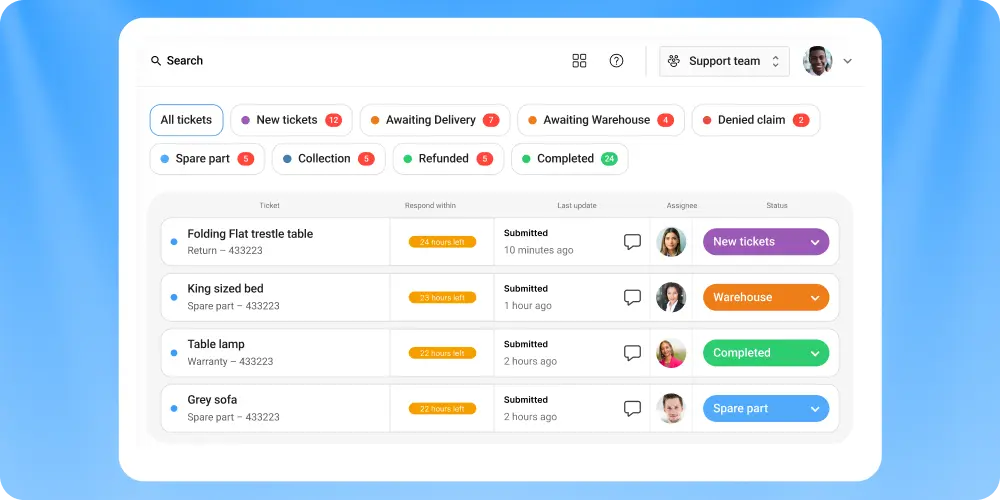
Claimlane: A warranty management software with field service features
Claimlane is primarily known as a warranty management platform, but it also includes practical field service features that support repair workflows from start to finish.
This makes it a strong fit for manufacturers, brands, and service organizations that handle both warranty claims and technician-led repairs.
How technicians use Claimlane in the field
Claimlane provides technicians with a mobile-friendly app where they can submit repair information directly from the job site.
Technicians can:
- View assigned repair jobs
- Submit repair details and diagnostic notes
- Upload photos and documentation (includes videos)
- Confirm parts used and work completed
This reduces manual reporting and ensures repair data is captured accurately while the work is being done.
End-to-end repair and warranty workflows
One of Claimalne’s strengths is workflow customization. Businesses can build structured processes that connect customers, internal teams, and field technicians.
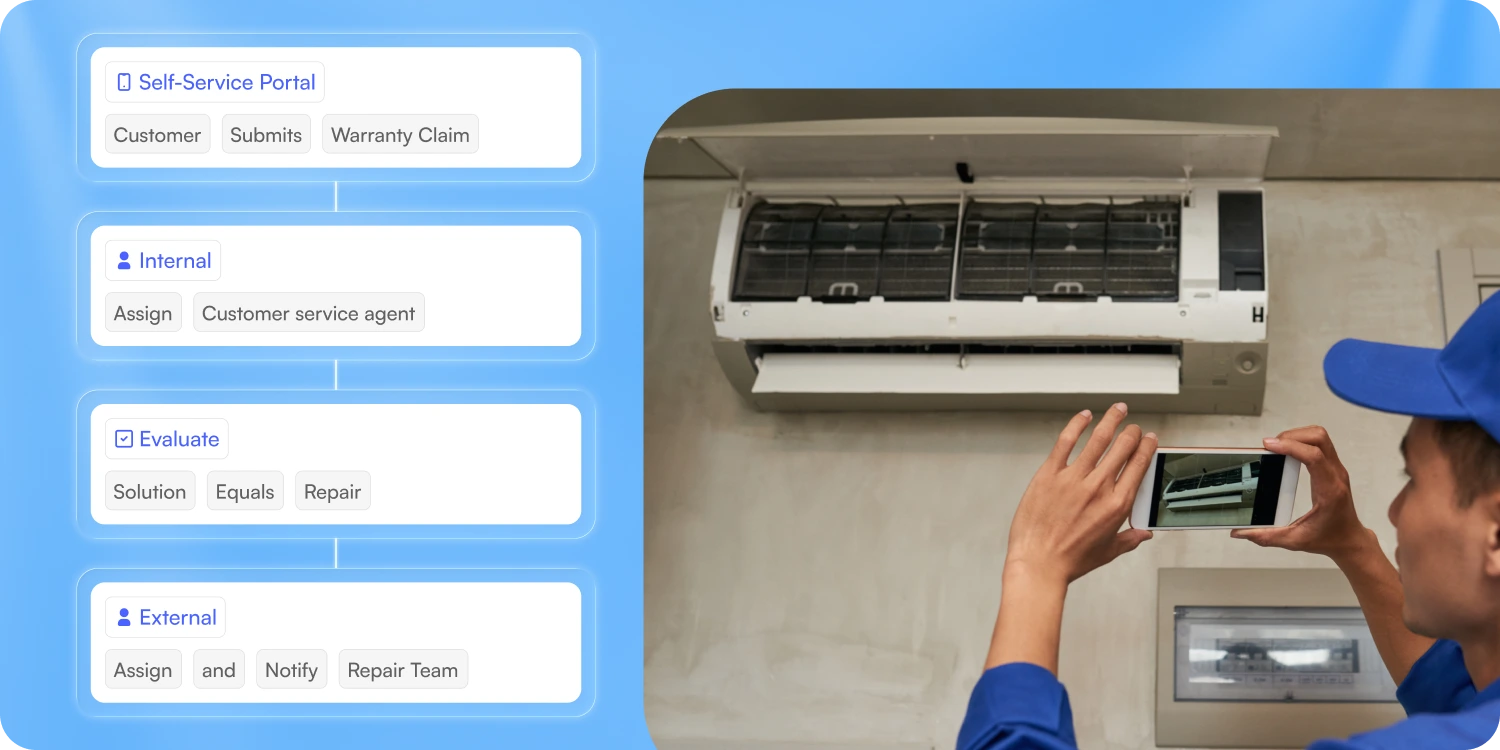
Typical workflow flow:
- A customer submits a repair or warranty request
- The request is reviewed and approved internally
- A repair job is created and assigned
- The technician is notified automatically
- The customer receives status updates
- Repair data is submitted and tracked centrally
These workflows help eliminate email chains, manual follow-ups, and status confusion.
Internal and external communication in one system
Claimlane supports communication at multiple points in the repair lifecycle.
Communication capabilities include:
- Internal notifications for service teams
- Technician alerts for new or updated jobs
- Customer notifications for status changes and outcomes
This keeps everyone aligned without relying on separate tools or constant manual updates.
When Claimlane is a good fit
Claimlane works especially well for organizations that:
- Manage warranty claims and repairs together
- You sell consumer goods while also offering a repair service
- Need structured approval and documentation workflows
- Want technicians to submit repair data digitally
- Require clear communication with customers during repairs
For businesses where warranty management and field service overlap, Claimlane helps connect those processes into a single, trackable system.
Mobile Field Service Management Software: How a Field Service App Helps Technicians
A field service app is the mobile field service software your technicians actually use day to day.
The app is just as important as the overall field service management software. Service technician software needs to make your technicians' lives as easy as possible.
Why a field service app matters
- Gives technicians instant access to job details, schedules, and customer history
- Reduces phone calls and back-and-forth with dispatch
- Allows technicians to capture notes, photos, and signatures on site
- Supports offline work when internet access isn’t available
- Speeds up job closeout and invoicing
The application is just as important as the overall field service management software. You need to a tool that makes your technicians lives as easy as possible.
Benefits of Field Service Management Software
The real value of FSM software isn’t the feature list. It’s what changes in the business once everything is connected. Below are the most important benefits of field service management software, explained in plain business terms.
Higher technician productivity
When technicians have clear schedules, complete job details, and mobile access to information, they get more done.
What improves
- Less time spent calling the office
- Fewer repeat visits due to missing information
- Faster job completion
- Easier data sharing between technicians and your systems
Why it matters
- More jobs completed per day
- Better use of labor costs
- Less frustration for technicians
Lower operating costs
FSM software helps reduce waste that often goes unnoticed.
Cost savings come from
- Reduced overtime through better planning
- Lower fuel costs with smarter routing
- Fewer billing errors and missed charges
Better customer experience
Customers feel the difference when operations run smoothly.
Customer-facing improvements
- More accurate arrival windows
- Fewer missed or late appointments
- Faster invoicing and follow-ups
Clear visibility into operations
Without FSM software, many managers rely on guesswork. With it, they rely on data.
What you can see
- Job status in real time
- Technician workload and performance
- Bottlenecks in scheduling or dispatch
Scale field service operations
One of the biggest benefits is scalability.
FSM software helps businesses
- Add technicians without your process being slowed down
- Standardize processes across teams
- Maintain quality as job volume increases
Conclusion
Field service management software isn’t about adding complexity. It’s about removing friction from daily operations. The key is choosing a field service management tool that fits how your business actually works today, while still supporting where you're headed next.



