.webp)
Most brands hit the same wall around the 50th monthly return: the helpdesk that runs customer support is the wrong tool to also run warranty claims. The ticket model that handles "where is my order" can't structure a claim with photos, supplier evidence, and a credit recovery path.
The answer is rarely to swap tools. It is to add the second one. Zendesk runs the conversation. Claimlane runs the claim. The two integrate, and the brands at scale use both.
This guide covers what each platform is built for, where each one breaks down when stretched into the other's job, when one of them is enough on its own, and the specific workflow that most brands run when they integrate the two. Claimlane is the platform built for the post-purchase side, with native Zendesk integration and an AI Agent that handles the claim review most helpdesk macros cannot.
The Fundamental Difference in One Paragraph
Zendesk is built around the ticket. Every customer interaction becomes a thread, with the data captured in free-form fields the agent fills in. Claimlane is built around the claim. Every return, warranty case, or repair becomes a structured record with required fields, photo evidence, supplier routing, and a defined resolution path. The difference is conversational tooling versus operational tooling. Both matter. Neither replaces the other.
Side-by-Side Comparison
What Zendesk Is Built For
Zendesk is a customer service platform. It captures every customer conversation across email, chat, phone, and social channels and gives agents one workspace to manage them. The ticket model is fast to capture and easy to reply from. Macros handle routine answers. SLAs hold response times accountable.
For general support across any industry, Zendesk is the category leader. Order status questions, product information, sales support, technical inquiries, account changes — all of it sits cleanly inside the ticket model.
The places Zendesk earns its position: omnichannel ticketing, mature knowledge base and self-service, intelligent routing, AI-assisted response suggestions, deep reporting on agent productivity, and a mature ecosystem of integrations.
What Claimlane Is Built For
Claimlane is a returns and warranty platform built for brands selling physical products. Every return, warranty claim, or repair becomes a structured record. The intake captures photos, video, order data, serial numbers, and defect classification. Validation gates ensure the claim is complete before it reaches an agent. Routing pushes the claim to the right team or directly to the supplier with all evidence attached.
The places Claimlane earns its position: structured intake with required evidence, self-service portal for customers, AI-driven defect classification, supplier forwarding with credit recovery tracking, repair and spare-parts management, SKU-level analytics on defect patterns and supplier performance, and integration with Zendesk and other helpdesks.
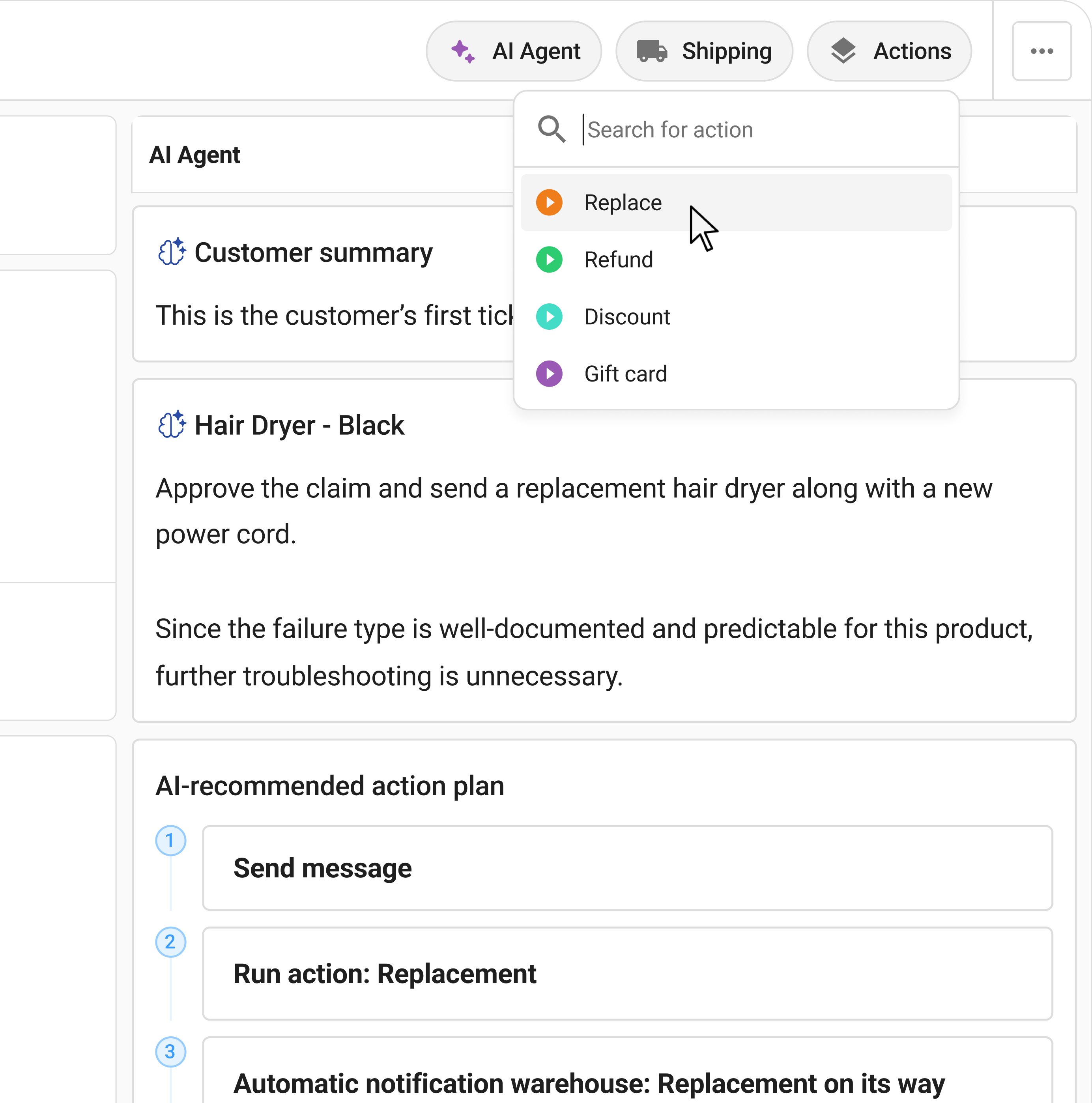
Claimlane's AI Agent, the first AI agent purpose-built for warranty claims and returns, reviews submitted images and video, applies warranty rules per product and supplier, and recommends or auto-approves resolutions. The AI side of the platform handles the cases that helpdesk macros cannot.
Where Zendesk-Only Breaks Down for Returns
Brands that try to run returns and warranty claims through Zendesk alone hit predictable failure modes once volume passes about 50 claims a month.
The failure modes share a root cause. Zendesk's ticket model was not designed to enforce structured data, multi-party workflows, or supplier handoff. Forcing it to is possible. It is also expensive.
When Zendesk-Only Is Actually Fine
The honest call: not every brand needs Claimlane. Zendesk alone covers the returns workflow well enough when:
- Return volume is low. Fewer than 50 to 100 claims a month.
- Resolutions are simple. Quick refund, no supplier recovery, no repair workflow.
- Evidence is minimal. No serial numbers, no batch tracking, no warranty rules per SKU.
- There are no suppliers to chase. The brand owns the supply.
- The team has bandwidth for manual coordination.
For brands fitting that profile, the operational cost of adding a second platform is higher than the upside. Stay on Zendesk and revisit the question when claim volume grows or supplier complexity arrives. The returns automation overview covers what the breaking point looks like in practice.
How Brands Actually Run Both Together
For brands selling physical products at meaningful volume, the working pattern is Zendesk plus Claimlane, integrated. The two platforms divide the work cleanly.
Zendesk handles the front door. Every customer conversation starts there. General inquiries, account questions, sales support, and the initial contact for any returns or warranty case sit in the Zendesk ticket. The agent talks to the customer in the channel the customer reached out on.
Claimlane handles the operational engine. The moment a conversation involves a return, warranty case, or repair, the structured workflow moves into Claimlane. The customer files through the self-service portal with photos, video, order data, and defect classification. The AI Agent reviews the evidence. The workflow routes to the right team, supplier, or auto-resolution path. The financial outcome is logged for finance to reconcile.
The Zendesk ticket stays open the whole time. As the Claimlane case progresses, status updates sync back into the original ticket. The Zendesk agent sees the claim status without leaving the inbox. The customer hears updates through the channel they originally contacted on.
The Zendesk + Claimlane Workflow in 5 Steps
Proof Points
How Long the Integration Takes
The technical integration between Claimlane and Zendesk takes about 2 to 4 weeks for most brands. The work is not on the connection itself. It is on mapping the existing returns and claims processes into Claimlane's workflow structure: defining categories, supplier policies, validation rules, and approval chains.
Brands with clear processes already documented deploy in 2 to 4 weeks. Brands using the implementation as a chance to clean up their workflows take 4 to 8 weeks. Either way, the bigger investment is change management for the team, not engineering hours.
The signal that the integration is ready: the support team can pick up a returns or warranty case in Zendesk, hand it off to Claimlane, and never lose context. The customer hears one consistent story through the channel they used. Finance gets the audit trail at period-end without chasing tickets.
Frequently Asked Questions
Where to Start
For brands not yet hitting the 50-claim-per-month threshold, stay on Zendesk and revisit when volume grows. For brands above that threshold, the right next step is to look at what claim categories take the most agent time. If furniture damage, electronics warranty, or supplier-attributable defects make the top of that list, Claimlane fills the structural gap Zendesk was never built to cover.
The cleanest way to evaluate the fit is to look at a real recent claim. Trace how it moved through Zendesk. Count the round-trips with the customer. Count the agent hours. Count the supplier credit that did or did not come back. That number is the case for adding Claimlane. The interactive demo walks through the integration with a real brand's workflow, or the book a demo page sets up a walkthrough with the team.