
A better return starts with the right information
A customer emails a retailer about a broken chair. The agent asks for an order number, then a photo, then confirmation of which part has failed. Several messages later, the team can finally assess the request.
A return portal gives that conversation a more useful starting point. Customers identify their purchase, explain the issue and provide the details needed for the next step in one place.
For retailers selling furniture, electronics and other durable goods, that next step might be a refund, repair, replacement or spare part. The portal needs to support those different paths and connect the request to the team responsible for completing it.
- A return portal lets customers submit a return or product issue through a structured online process.
- Useful portals ask questions based on the product and reason, so teams receive relevant information upfront.
- The workflow should connect customer submissions with decisions, shipping, inspection and the agreed outcome.
- Claimlane combines a self-service portal with workflows for returns, warranty claims, repairs and spare parts.
What is a return portal?
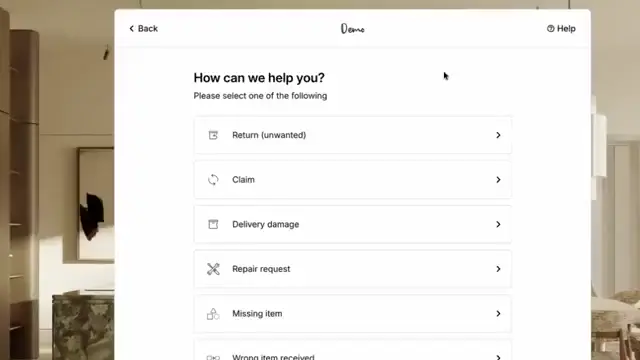
A return portal is a customer-facing online interface for starting a return request. It typically helps the customer identify a purchase, select an item and explain why they need assistance.
Depending on the system and configuration, the portal can also collect supporting evidence, present available options, provide shipping instructions and show progress updates.
“Return portal” and “returns portal” describe the same general concept. An online return portal may sit within a retailer's website or on a separate branded page linked from its customer service area.
The portal is the customer's entry point. The wider returns management process determines how the request is assessed and completed.
How does an online return portal work?
A typical journey begins with purchase identification. The customer enters the required details or accesses the relevant order through an authenticated account or link.
Next, the customer selects the item, quantity and reason for the request. The portal asks any relevant follow-up questions and records the submission.
The request then follows the business's configured process. A straightforward case may receive an automatic next step, while another requires an agent to review the evidence.
The confirmation should explain what has happened and what comes next. “Request received” and “Return approved” describe different stages and should have different messages.
Why retailers introduce a returns portal
Unstructured email requests leave agents to discover what is missing. One customer sends a receipt without a product photo; another describes a fault without identifying the item.
A portal can ask for those details at the relevant point. This gives the team a more consistent basis for reviewing cases and reduces the need to repeatedly request standard information.
The benefit depends on what happens behind the form. If agents must copy every submission into another system, much of the administrative work remains.
A useful implementation therefore defines both the customer journey and the internal actions that follow it.
Features to look for in a return portal
The right feature set depends on the products, sales channels and outcomes the retailer supports. The following checklist provides a practical starting point for a demonstration.
| Capability | Why it matters | What to check |
|---|---|---|
| Purchase identification | Connects the request to the correct transaction | Guest purchases, split orders and missing order details |
| Conditional questions | Collects information relevant to the issue | Different paths for unwanted, damaged and faulty products |
| Evidence uploads | Supports assessment before further action | Mobile uploads, clear instructions and upload recovery |
| Multiple outcomes | Accommodates more than a refund | Repair, replacement and spare part workflows |
| Shipping and collection | Gives customers usable return instructions | Parcel labels and bulky-item collection arrangements |
| Case visibility | Explains progress and outstanding actions | Customer updates that reflect actual case events |
| System connections | Keeps operational records consistent | Order, warehouse, support and financial updates |
Ask different questions for different products
A scratched table and a headset that will not charge need different evidence. Giving both customers the same long form can create unnecessary effort while still missing useful details.
Conditional questions let the portal adapt to the selected product and reported issue. A furniture request might need a photo of the damaged component. An electronics case might need a model reference and a description of the fault.
Each required field should support a decision or action. Information already available from the order should be reused where possible.
Instructions should explain what a useful upload shows. Asking for a close-up of a broken leg and a wider photo of the chair is clearer than asking for “supporting documentation”.
Separate unwanted items from product problems
A customer returning an unwanted product has a different need from someone reporting a missing part or a fault. The first question should establish the nature of the request.
The portal should then apply the appropriate process for that case type. A standard change-of-mind return window should not automatically block every route for reporting a faulty product.
Rules need to reflect the retailer's policies, product warranties and applicable customer rights. Cases that do not fit a standard path should have a visible route to review.
This also improves the usefulness of the data. A general reason such as “other” provides less operational detail than a clear distinction between damage, missing components and an unwanted purchase.
Support repairs and spare parts alongside returns
A physical return is not always needed to complete an approved product claim. An appropriate replacement component may resolve an issue without moving the entire item.
Consider an illustrative chair claim. The customer identifies the chair and uploads photos of a damaged foot. After checking compatibility and the applicable rules, the team may offer a suitable spare part.
In another case, a repair technician may need to inspect the product. The portal should collect enough information to route the request without presenting an unconfirmed remedy as approved.
A customer's preferred outcome is useful context. It should remain distinguishable from the outcome the business has authorised.
Make shipping instructions specific to the case
A printable parcel label may suit a small accessory. A sofa return may require collection arrangements, access details and confirmation of which items will be collected.
The portal should explain what the customer needs to send, how it should be prepared and whether accessories are required. Any customer-paid charges should be clear before the next action is confirmed.
For a partial return, the instructions should identify exactly which items or components are expected. That same information needs to reach the receiving team.
If shipping cannot yet be arranged, the confirmation should explain who will follow up. A submitted request should not imply that a collection has already been booked.
Connect the portal to the systems doing the work
A return request can involve an ecommerce platform, helpdesk, warehouse system, ERP and carrier. Each system holds information that affects the outcome.
The implementation should define which system owns each action. One system may issue the refund, another record receipt of the product and another hold the customer conversation.
Shared identifiers help keep these records connected. The case should retain the relevant order, item and return references so teams can trace what happened.
Failed actions need a visible recovery path. A refund request that has not succeeded should remain distinguishable from a completed refund, and a repeated event should not create another payment or stock movement.
Give customers useful progress updates
Submitting a form does not remove the customer's need to know what is happening. Confirmation messages should give a case reference and explain the immediate next step.
Useful updates describe real events: information requested, return approved, item received, inspection completed or refund issued. Internal status names may need clearer customer-facing wording.
Where the team is waiting for the customer, the message should explain the required action. Where the team is waiting for a supplier or repair partner, the customer should still know who owns the case.
Progress updates should follow confirmed events rather than assumptions about how quickly another system will act.
Keep self-service accessible and easy to complete
A portal should work on the device a customer has available. Test product selection, text entry and photo uploads on a phone, including what happens when an upload fails.
Clear field labels, understandable instructions and specific error messages help customers complete forms. Keyboard access and appropriate support for assistive technology should be part of the review.
Avoid making customers repeat the entire process after a recoverable error. Where possible, preserve entered information and explain how to correct the affected field.
There should also be an assisted route for customers who cannot complete self-service or cannot identify their order. That route should preserve information already supplied.
Measure whether the portal reduces follow-up work
Submission volume alone cannot show whether a returns portal is helping. A busy portal may still leave agents requesting missing evidence or customers asking for updates.
A suggested scorecard includes:
- Completion rate: completed submissions divided by started submissions.
- Information follow-up rate: cases needing additional intake details divided by reviewed submitted cases.
- Time to first meaningful action: elapsed time between submission and an assessment, information request or operational action.
- Resolution time: elapsed time between submission and the defined completed outcome.
- Status enquiry rate: submitted cases receiving a customer status enquiry divided by all submitted cases in the measured group.
These are proposed operational measures, not industry benchmarks or claims about built-in reporting. Teams should define their measurement windows and compare similar case types before and after launch.
Test the complete journey before launch
A successful form submission only verifies the intake step. Testing should follow the request until the customer message, case record and operational systems agree on the outcome.
Useful scenarios include a straightforward return, a faulty product, a partial order return, a missing order reference and a case needing human review.
The team should also test a failed upload, an unavailable replacement and a failed shipping or refund action. These cases show whether staff can find the problem and continue the work.
A controlled launch with a defined product group can help identify unclear questions before the portal is introduced across a wider range.
How Claimlane supports the return portal journey
Claimlane's self-service portal supports returns, warranty claims, repair requests and spare parts. Its published capabilities include custom fields, guided troubleshooting, translation and product-specific flows.
Customers can provide issue details and indicate a preferred outcome before the team reviews the case. The portal also supports return labels and collection paths, depending on the configured workflow.
Behind the customer interface, Claimlane provides workflows for routing cases and carrying out actions. A demonstration should show how those steps connect with the retailer's order, warehouse and support systems.
For the first time, we can see every warranty claim across all our stores and webshops in one place.
Cameron Darnell, Warranty Manager, Angling DirectClaimlane has a 4.8/5 rating on G2.
Frequently asked questions
Turn each request into a clear next step
A useful return portal gives customers a straightforward way to report an issue and gives the team the information needed to act. Its value becomes visible when requests move through assessment, fulfilment and completion with clear ownership.
For complex products, that means making room for repairs, spare parts and cases that need review. The customer journey should reflect the actual work required to resolve the problem.
Book a Claimlane demo to see how a return portal can connect customer submissions with warranty, returns and repair workflows.